
CS-Cart User Tracking Add-on: Visitor Analytics
The CS-Cart User Tracking Addon helps store owners monitor and analyze visitor activity in real time It tracks important visitor information such as IP address device type browser details visited pages session duration and traffic sources The addon also provides a dashboard with key statistics
The CS-Cart User Tracking Add-on records and reports how visitors use your store in real time. It captures details such as IP address, device type, browser, pages viewed, session duration, and traffic sources, and presents them in a dashboard showing today's visitors, page views, registered and guest users, top pages, and top referrers. It solves the problem of not knowing who is on your store or how they behave, giving administrators a single place to see live activity and historical patterns. It is aimed at CS-Cart store owners and administrators who want to understand customer behavior and measure marketing performance without relying only on external analytics.

The CS-Cart User Tracking Addon helps store owners monitor and analyze visitor activity in real time. It tracks important visitor information such as IP address, device type, browser details, visited pages, session duration, and traffic sources. The addon also provides a dashboard with key statistics, including today's visitors, page views, registered users, guest visitors, top pages, and top referrers, helping administrators better understand customer behavior.
The addon includes advanced management features such as active user monitoring, blocked IP management, and CSV data export. Administrators can configure tracking settings, define data retention periods, manage session activity, and exclude specific user groups from tracking. It also captures UTM parameters, allowing businesses to measure marketing campaign performance and make informed decisions to improve store engagement and conversions.
Features:
Real-Time Visitor Tracking: Monitor visitor activity across your store in real time, including pages viewed, session duration, and browsing behavior.
Comprehensive Visitor Analytics Dashboard: Get instant insights into today's visitors, page views, registered users, guest visitors, top pages, and traffic sources from a centralized dashboard.
Detailed Visitor Information: View complete visitor details such as IP address, device type, browser information, storefront, referrer source, and activity history.
Active User Monitoring: See all users currently online with an automatically refreshed active users list updated every 30 seconds.
Flexible Tracking Configuration: Customize tracking behavior with settings for session timeout, active session thresholds, data retention periods, and user group exclusions.
Data Retention Management: Automatically clean up old visitor records through cron jobs or manually remove outdated tracking data when needed.
Blocked IP Management: Block suspicious or unwanted visitors by IP address and maintain a record of blocked IPs, including reasons and dates.
CSV Data Export: Export visitor tracking data in CSV format for reporting, analysis, and record-keeping.
UTM Campaign Tracking: Capture UTM source, medium, campaign, term, and content parameters to measure marketing campaign performance effectively.
Dashboard Widget Integration: Display visitor activity statistics directly on the admin dashboard for quick access to important tracking data.
Traffic Source Analysis: Identify where visitors are coming from with detailed referrer tracking and traffic source reporting.
Visitor Browsing History: Review complete visitor journeys, including visited pages, session duration, and interaction history for deeper customer insights.
Installation:
How to install Addon
https://store.ecarter.co/blogs/how-to-install-addon/
Setting Configuration
These settings help the admin manage user tracking behavior, session activity, data storage duration, and excluded user groups for accurate visitor analytics.
- Enable Tracking:
- Checked: Visitor tracking is active.
- Unchecked: No user activity will be tracked, and no new session records will be created.
- Data retention(days):
This setting defines how long visitor and page view data will be stored.
- Records older than the selected number of days are deleted automatically.
- Cleanup happens through:
- Cleanup cron job
- Manual “Cleanup Old Data” option
- Active Session threshold(minutes):
This setting controls how long a visitor is considered online after their last activity.

- Session inactivity timeout(minutes):
This setting controls when a visitor session ends due to inactivity.
- Do not track user groups:
This setting excludes selected user groups from visitor tracking to keep analytics accurate and avoid recording staff or tester activity.
- Click on the Save button.

Visitor Tracking Dashboard
- Go to the Users >> Visitors.
- The statistics cards at the top of the Visitors page provide a quick overview of visitor activity and key metrics.
- Today’s Visitors: Shows the total number of visitors on the website Today.
- Today’s Page View: Displays how many pages were viewed today.
- Registered: Shows the number of logged-in or registered users who visited the store.
- Guest: Display visitors who browsed the website without logging in.
Top Pages(Today)
This section shows the most visited pages of the store today.
Example
- Product pages
- Home page
- Search pages
- Category pages
Top Referrers:
This section shows the sources from which visitors arrived before accessing your website.
Visitor Activity Table
- The Visitor Activity Table displays detailed visitor information, including visitor ID, device type, IP address, storefront, user type, browser details, referrer source, visited pages count, session duration, first visit time, last activity time, and management tools
Top Actions Buttons
- Active: Display users currently active on the website.
- Blocked IPs: Shows blocked visitors' IP addresses.
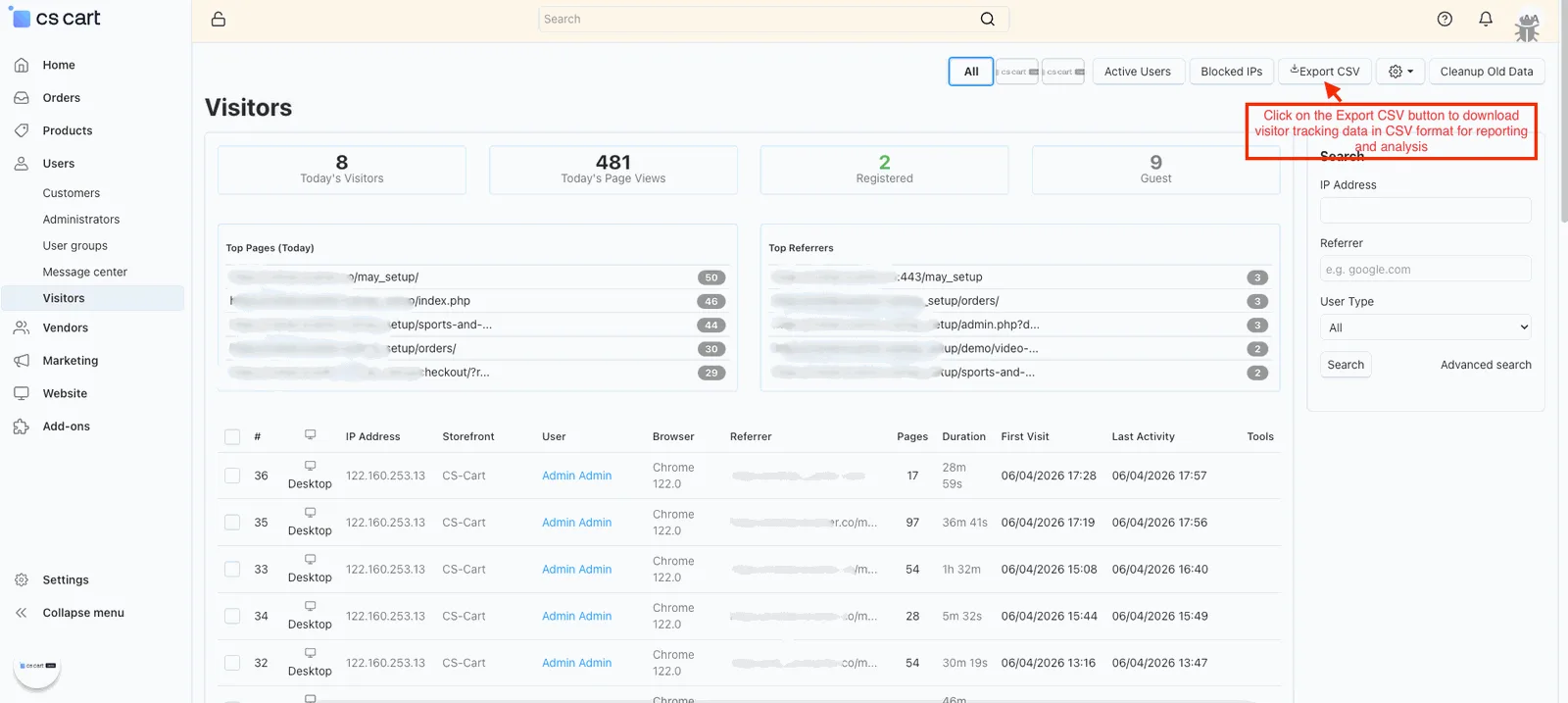
- Export CSV: Export visitor data into CSV format.

Dashboard Widget
The admin dashboard (homepage) includes a Visitor Tracking widget at the bottom that displays visitor activity details.
- Click on the Visitors button to open the visitors' detail page.

- Click on the Active Users button to view the list of users.

- The Active Users page shows all users currently online along with their activity details, and the list auto-refreshes every 30 seconds.

- Click on the Blocked IPs button to manage the list of blocked IP addresses.
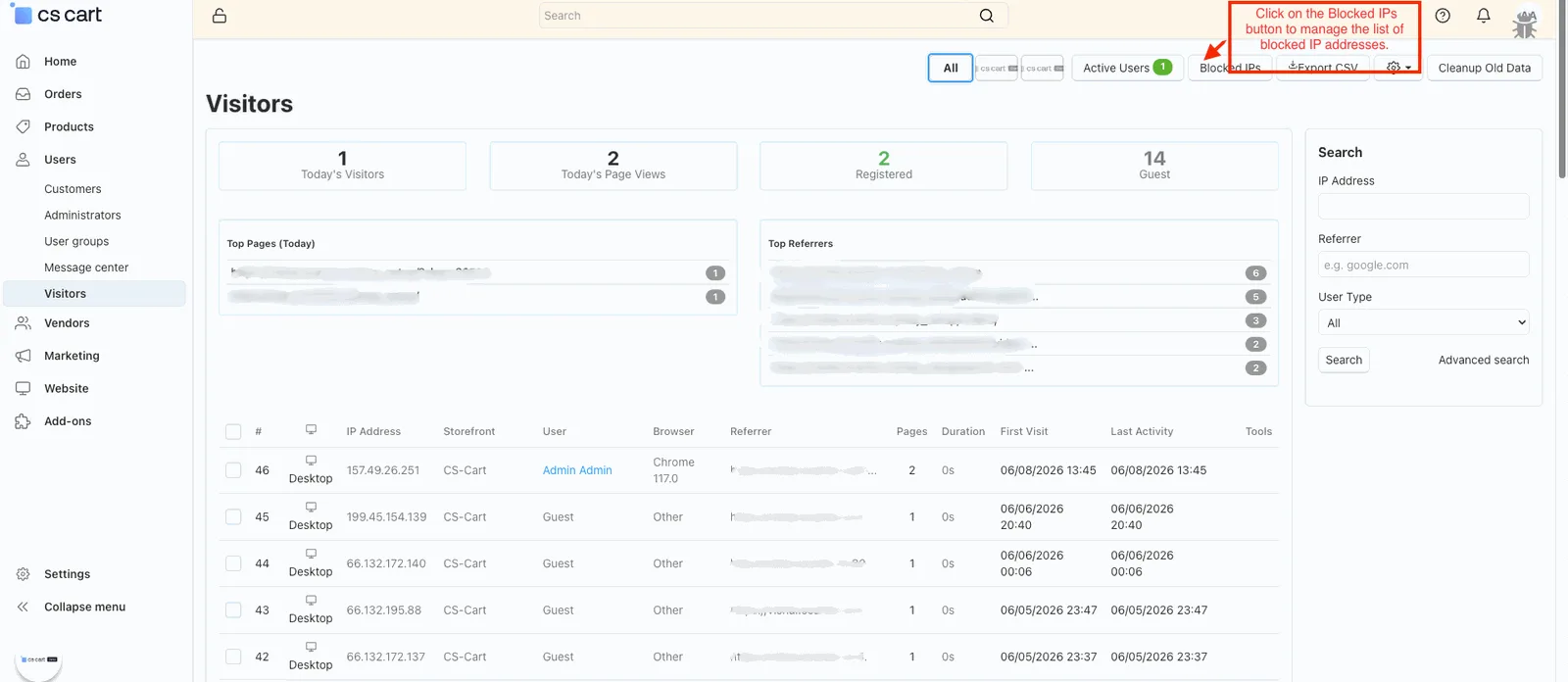
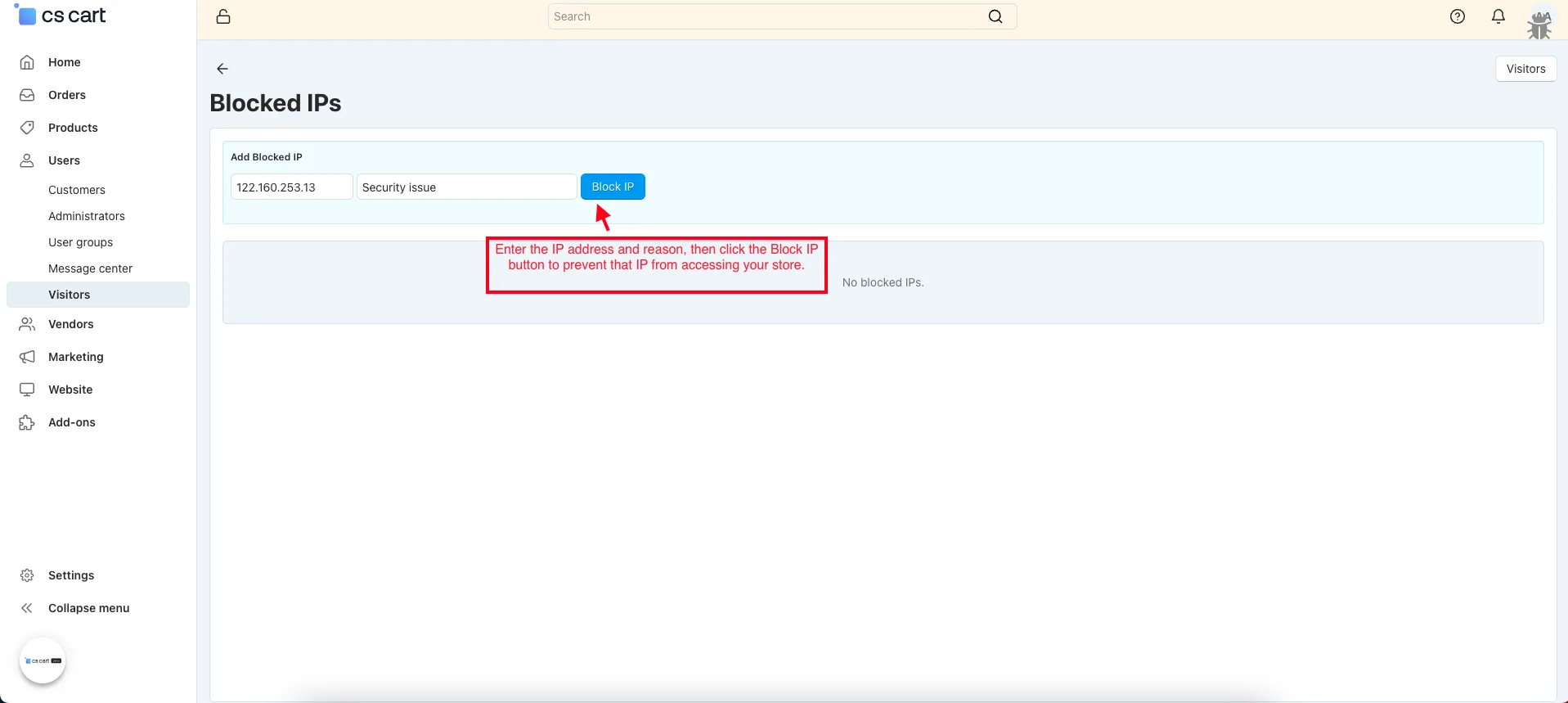
- Enter the IP address and reason, then click the Block IP button to prevent that IP from accessing your store.
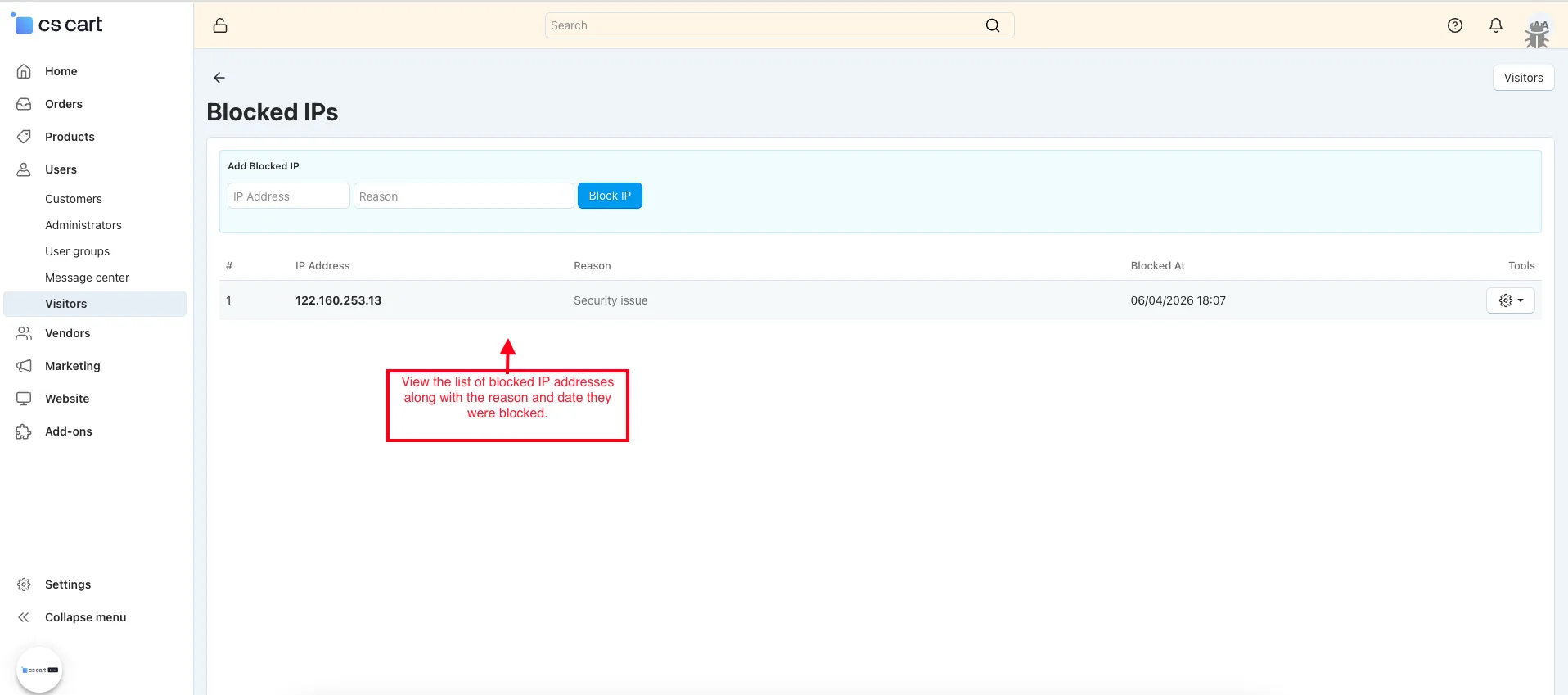
- View the list of blocked IP addresses along with the reason and date they were blocked.
- Click on the Export CSV button to download visitor tracking data in CSV format for reporting and analysis.
- View the CSV file of Visitor tracking data.
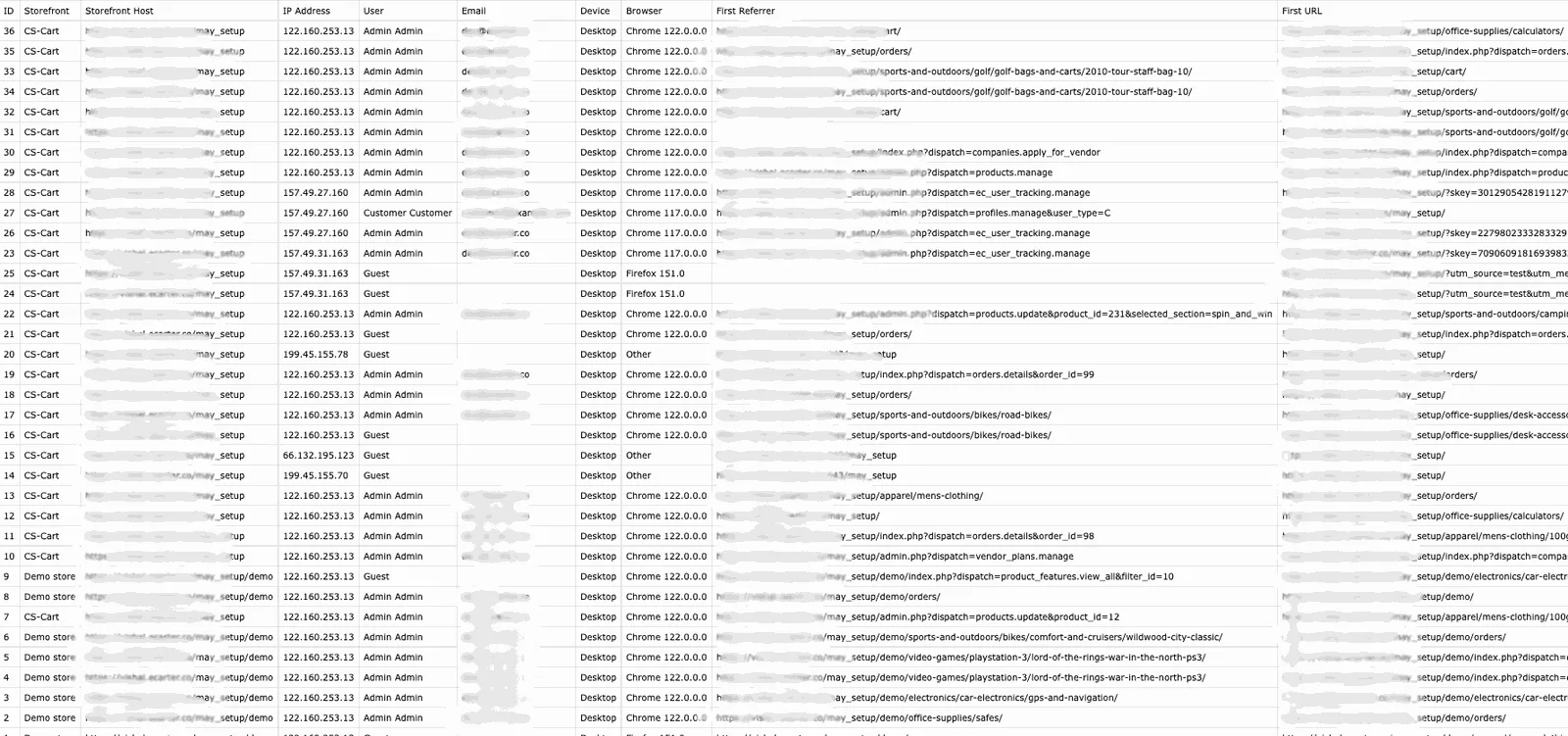
- Click on the view button to see the visitor details.
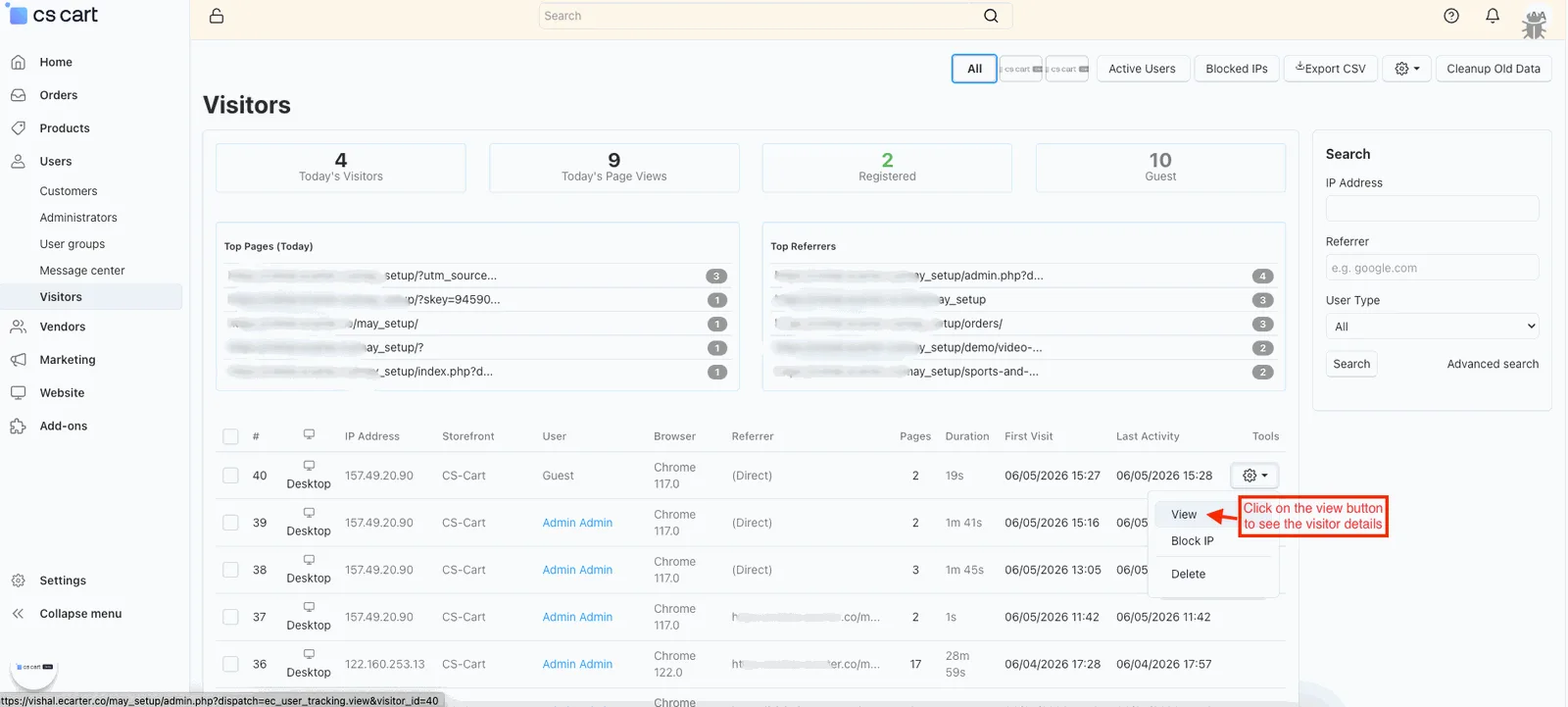
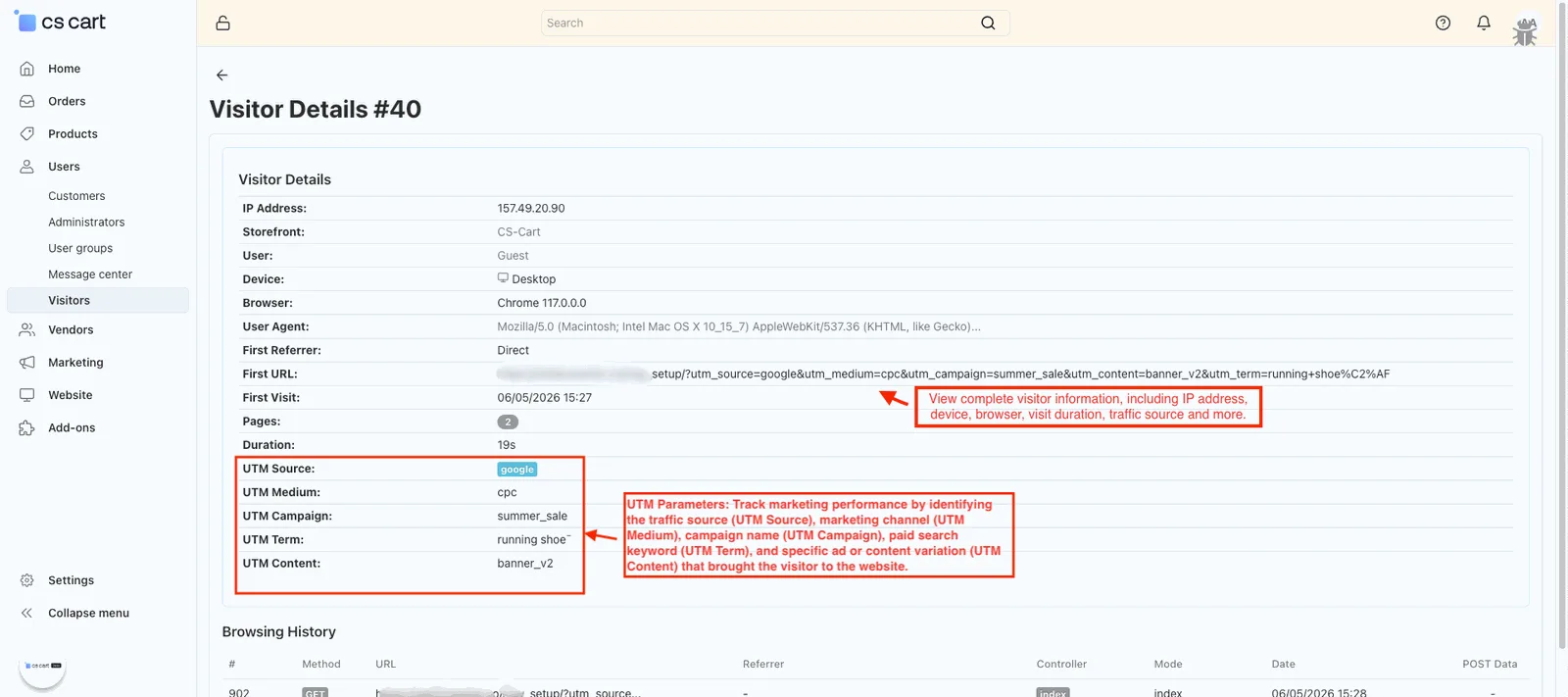
- Visitor Details: View complete visitor information, including IP address, device, browser, visit duration, traffic source, UTM parameters, and browsing history for detailed visitor activity tracking.
- UTM Parameters – UTM parameters are tracking tags added to a URL to identify where website visitors come from and measure the performance of marketing campaigns:
- UTM Source – Identifies the traffic source, such as Google, Facebook, Instagram, or a newsletter.
- UTM Medium – Indicates the marketing channel used, such as CPC, email, social, or referral.
- UTM Campaign – Specifies the name of the marketing campaign, promotion, or event.
- UTM Term – Tracks the keyword used in paid search advertisements.
- UTM Content – Distinguishes between different ads, banners, links, or content variations within the same campaign.
URL: Displays the first landing page visited by the visitor, including any attached UTM parameters
Final thought
The CS-Cart User Tracking Addon provides a powerful and user-friendly way to monitor visitor activity, understand customer behavior, and analyze website performance. With real-time tracking, detailed visitor insights, traffic source monitoring, UTM campaign tracking, and IP management tools, store administrators can make informed decisions to improve marketing strategies, enhance security, and optimize the overall shopping experience. Whether you want to track engagement, identify traffic trends, or generate detailed reports, this addon offers all the essential tools needed for effective visitor analytics and store growth.
Frequently asked questions
What visitor data does the CS-Cart User Tracking Add-on collect?
It records IP address, device type, browser details, storefront, referrer, visited pages, session duration, and traffic sources. It also captures UTM parameters so you can attribute visits to specific marketing campaigns.
Can I measure marketing campaign performance with this add-on?
Yes. It captures UTM parameters and reports top referrers and traffic sources, so you can see which campaigns and channels bring visitors and use that to inform decisions about engagement and conversions.
What controls does the admin have over tracking and stored data?
Administrators can configure tracking settings, set data retention periods, monitor active users and session activity, manage blocked IPs, and exclude specific user groups from tracking. Collected data can also be exported to CSV.
Is the add-on compatible with my version of CS-Cart or Multi-Vendor?
It is built for CS-Cart storefronts and reports per-storefront visitor data, which suits multi-storefront setups. Share your exact CS-Cart or Multi-Vendor version and we will confirm compatibility for your installation.
Nisha Gaur is a Technical Content Writer at Ecarter Technologies. She writes technical documentation, tutorials and buying guides covering CS-Cart, Magento, Shopify and eCommerce development.