
CS-cart Customization and design
Making the CS-Cart online store look better is simple with customization and design. Some tools make it easy to change how the store appears.
This post is an overview of how storefront customization and design work in CS-Cart. It explains the built-in tools an admin can use to change the look of a CS-Cart store, including pre-designed themes and templates, the layout editor for positioning elements like banners and products, the theme editor for settings such as icons, and direct CSS or code changes for more advanced work. It also notes that add-ons and extensions can add extra features, and that these tools have some limits worth knowing before you start. It is aimed at CS-Cart store owners and admins who want to adjust colors, fonts, and layouts without necessarily writing code.
Making the CS-Cart online store look better is simple with customization and design. Tools like themes, layout editors, and CSS customization make it easy to change how the store appears. These tools let the user adjust things like colors and layouts.
While these tools let users do a lot of things, it is crucial to know that there are some limits and important things to consider when the user is changing the store's looks.
Cs-cart storefront customization
The admin can use such tools to improve the storefront design and can customize it accordingly. They can pick a theme they like. Layout editor helps them decide where things appear in the store like banners or products. With the knowledge of coding, they can directly change the code for more advanced customization. Also, there are addons or extensions like apps for extra features.
Tools for Customization
Let’s look into tools and understand them briefly for storefront customization in CS-Cart:
Theme and templates
CS-Cart provides a variety of pre-designed themes and templates that the admin can choose from. These themes are customizable to a certain extent, allowing individuals to change colors, fonts, and layout elements. Admin can also create their custom themes if they have the technical expertise.
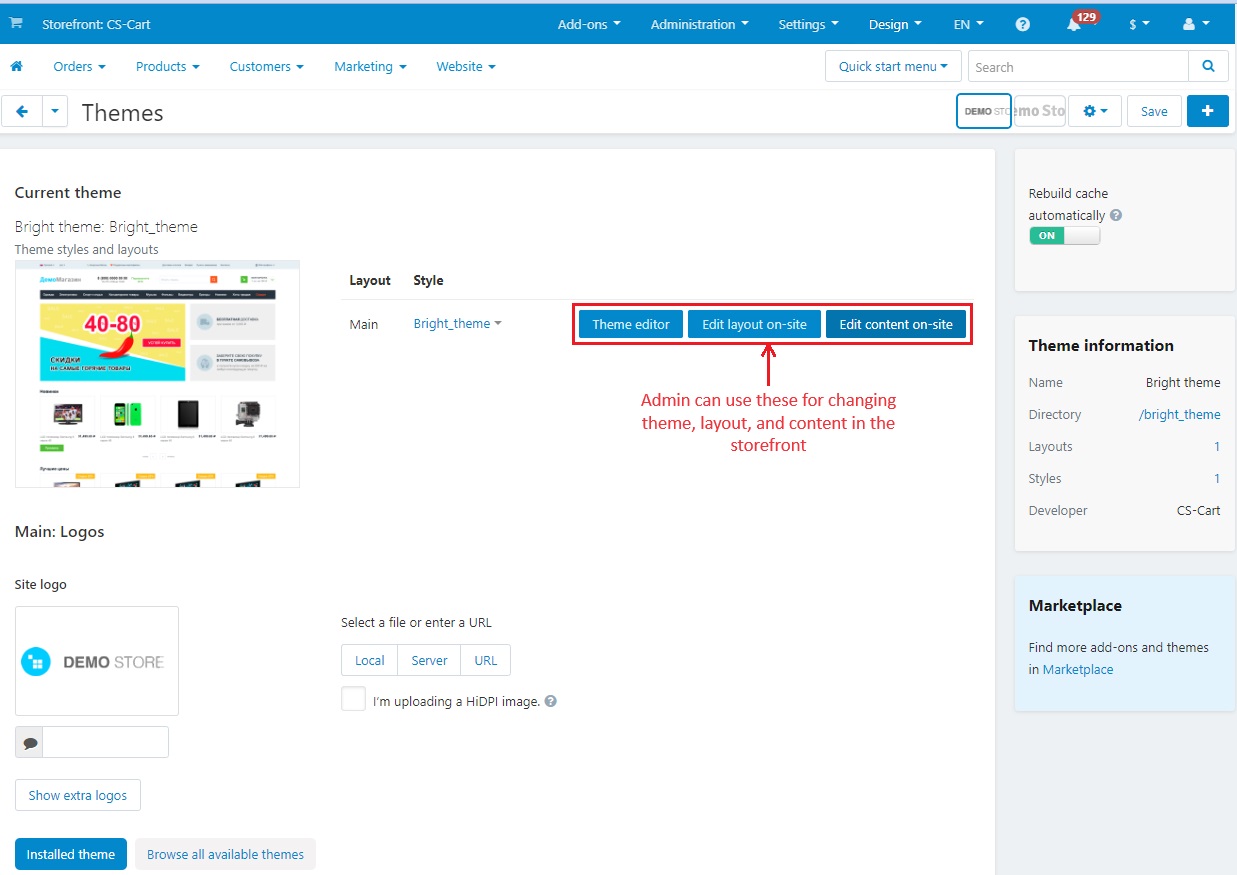
Theme editor
The Theme editor page allows the admin to change the following points:
- General Section: Customize the small icon (Favicon). It also decides whether to make the corners round or not.
- Logos: Change the logos of the overall theme, email, and gift certificates.
- Colors: Change the color of almost every element of the storefront.
- Font: Adjust the text styles for different sections of the store.
- Backgrounds: Can choose background colors for different areas.

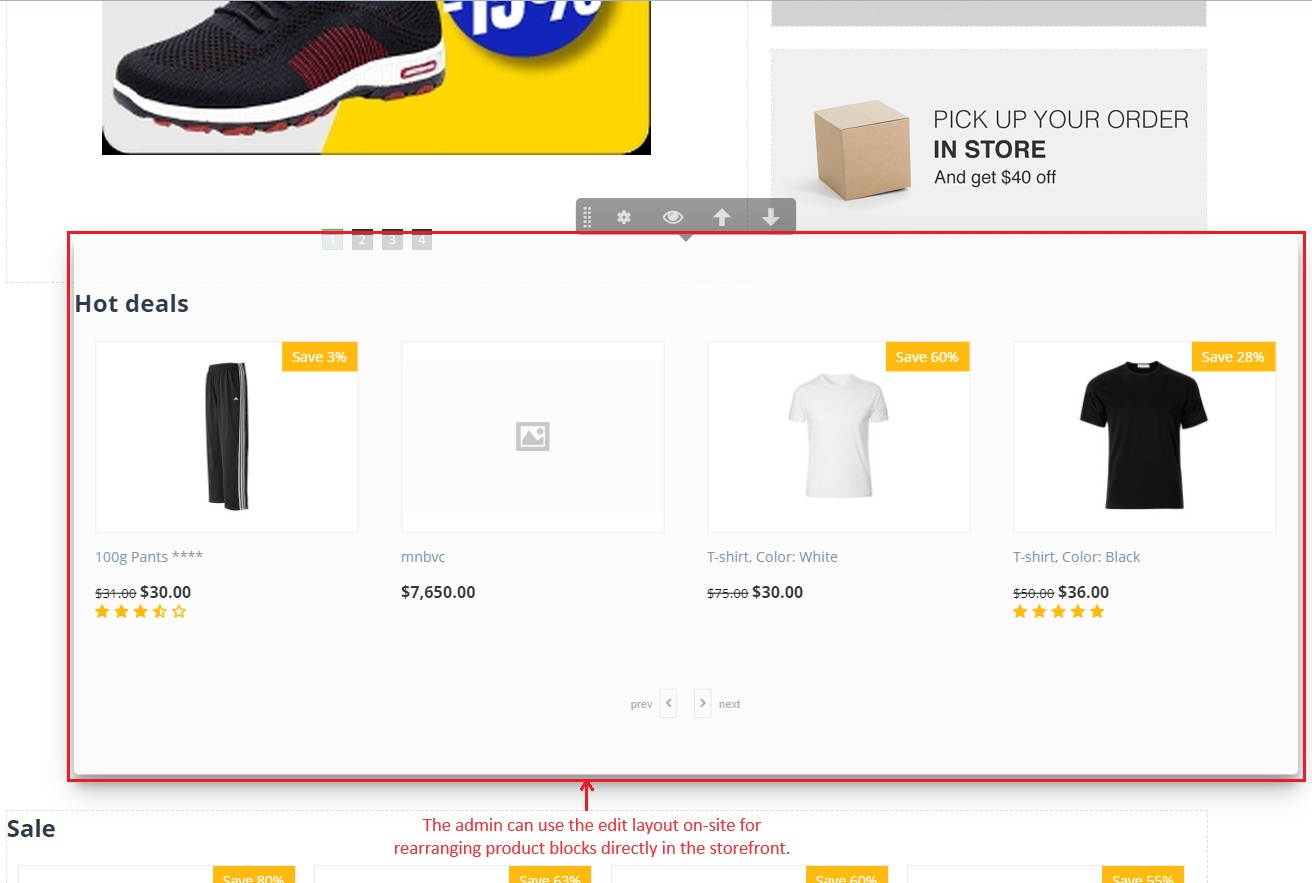
Edit layout on-site
The admin can use this edit layout on-site for rearranging product blocks directly in the storefront.
Edit content on-site
Edit content on-site allows admins to change things directly on the storefront. They can edit how things look, product names, prices, and more on the storefront.

Installed themes
In the installed theme tab, the admin can find a variety of styles for the store. For example, the default responsive theme comes with different looks like black, Brightness, Facebook, and more.

Layout Edit:
The layout option in the design menu allows the admin to edit the layout and configure the position of blocks and elements on the storefront. This can include banners, product grids, and other components. The layout is designed to be user-friendly. This allows admin panel users to make changes even without deep technical knowledge.
Layout pages consist of blocks and these blocks are nested inside the containers. The block contains specific information like product details, logo, breadcrumbs, etc. Admin can add, edit, remove, and easily move blocks to modify the page's structure.


CSS customization: For advanced users, CS-cart allows direct customization of CSS. This gives the admin the flexibility to make detailed changes to the appearance and structure of the storefront. 
Add-ons and Extensions: CS-Cart has a marketplace for various add-ons and extensions. These can enhance the functionality of the storefront and may include additional design elements. Some add-ons may also provide specific customization options.
Limitations and Considerations in Storefront Appearance Modification
When the CS-Cart admin panel user wants to make the online store look the way they want, there are a few things to remember:
- Theme Options have Limits: CS-Cart allows the user to choose themes and make them look how the user wants, but there are some things they cannot change. Not everything is adjustable.
- Coding knowledge for Advanced Changes: If the user wants some specific changes and knows a bit about coding, they can do more. But, if coding is not their thing, there are still plenty of other customization options.
- Layout Changes need some understanding: Rearranging how things appear on the store is possible with the layout editor, but it requires a basic understanding of how the layout works.
- CSS Customization requires skill: Directly changing the CSS is a powerful tool for advanced users, but it requires some skill. It is not recommended unless the user is comfortable with coding.
- Add-Ons Might Be Limited: While there are various add-ons and extensions available, not all may perfectly fit specific design needs. Some customization might be necessary to align them with the desired appearance.
Frequently asked questions
What tools does CS-Cart provide for storefront customization?
CS-Cart includes pre-designed themes and templates, a layout editor for placing elements such as banners and products, a theme editor for settings like icons, and CSS or direct code changes for advanced work. Add-ons and extensions can add further features.
Can I customize a CS-Cart store without coding knowledge?
Yes. Themes let you change colors, fonts, and layout elements, and the layout editor lets you decide where things appear, all without code. Coding knowledge is only needed for more advanced changes, such as editing CSS or creating a custom theme.
What can the theme editor change?
The theme editor lets the admin adjust theme settings from a single page, including general options such as the store's small icon. It works alongside the layout editor and theme selection for controlling the overall storefront appearance.
Are there limits to CS-Cart customization?
Yes. While themes, the layout editor, and CSS give you a lot of control, there are limits and important considerations to keep in mind when changing the store's appearance. More advanced or non-standard changes generally require coding knowledge or add-ons.
Kajal is a Technical Content Writer at Ecarter Technologies. She writes technical documentation and in-depth guides on eCommerce platforms, mobile commerce and AI in online retail.