
Vendor Password Field
The Vendor Password Field add-on for CS-Cart allows the admin to control how and when the password fields are displayed for vendors during registration and first login Using the Select Input Field option the admin can decide after which profile field the password and confirm password fields will
The Vendor Password Field add-on for CS-Cart gives the store admin control over how and when password fields appear for vendors during registration and first login. Using its Select Input Field option, the admin decides after which profile field the Password and Confirm Password fields show on the vendor registration or profile form, while the confirmation field checks that both entries match to cut down on login errors. An optional setting can require vendors to change their password on their first login, adding a layer of account security. It is intended for CS-Cart store administrators who want tighter control over vendor password setup and stronger vendor account security.

The Vendor Password Field add-on for CS-Cart allows the admin to control how and when the password fields are displayed for vendors during registration and first login. Using the Select Input Field option, the admin can decide after which profile field the password and confirm password fields will appear on the vendor registration or profile form.
With the Vendor Password Update setting enabled, vendor admins are required to change their password on their first login, ensuring better account security. During registration, the Password and Confirm Password fields allow vendors to create and verify a secure password, reducing login errors.
Features:
- Admin Control over Password Field Position: Allows the admin to choose after which profile field the password and confirm password fields will appear on the vendor registration or profile form.
- Password & Confirm Password Fields: Displays password and confirm password fields during vendor registration, ensuring vendors create and verify a secure password.
- Mandatory Password Update on First Login: Enable this option to require vendors to change their password when they log in for the first time.
- Error-Free Password Confirmation: Ensures the entered password and the confirmation password match correctly, reducing login issues.
- Enhanced Vendor Account Security: Works with CS-Cart security settings to enforce password updates and improve overall vendor account protection.
- CS-Cart Support Information: The addon is well-integrated with CS-Cart Multi-Vendor and can be used with its Standard, Plus, and Ultimate versions.
Installation:
How to install Addon
https://store.ecarter.co/blogs/how-to-install-addon/
Workflow
Admin Settings Configuration
These settings allow the admin to control how the vendor password field works during vendor registration or login.
- Select input field: This option allows the admin to choose the profile field after which the password field will be displayed on the vendor registration or profile form.
- Vendor Password Update: When this option is enabled, vendor admins are required to update their password on their first login.

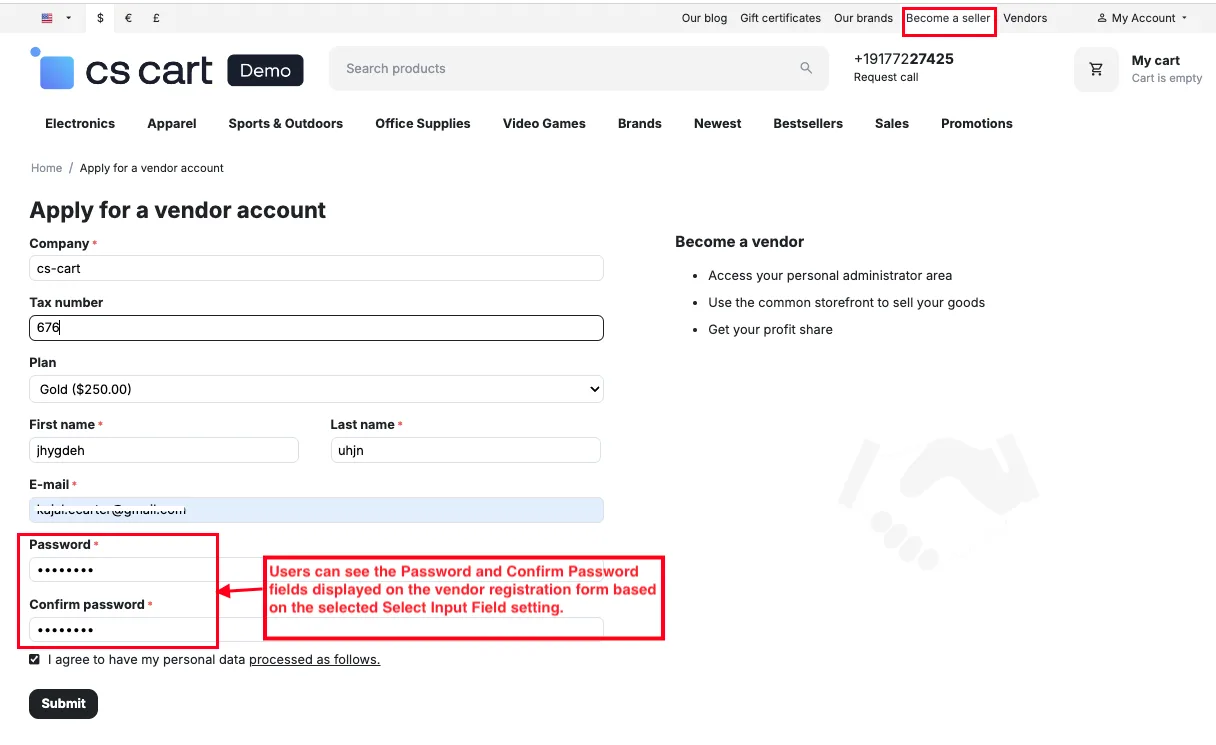
Password & Confirm Password Fields on Vendor Registration
These fields appear on the vendor registration form according to the selected Select Input Field setting, allowing vendors to create and confirm their password during signup for secure account access.
- Password: This field is displayed on the vendor registration form according to the Select Input Field setting, allowing vendors to set a secure password during signup.
- Confirm Password: Shown along with the Password field, this option ensures the entered password is rechecked and matched correctly to prevent login errors.
- Enable the "Vendor Password Update" setting to require vendors to change their password on first login.

- Go to the Settings >> General >> Security Settings.
- Force administrators to change password on the first login: When enabled, administrators must update their passwords during their first login to ensure account security.

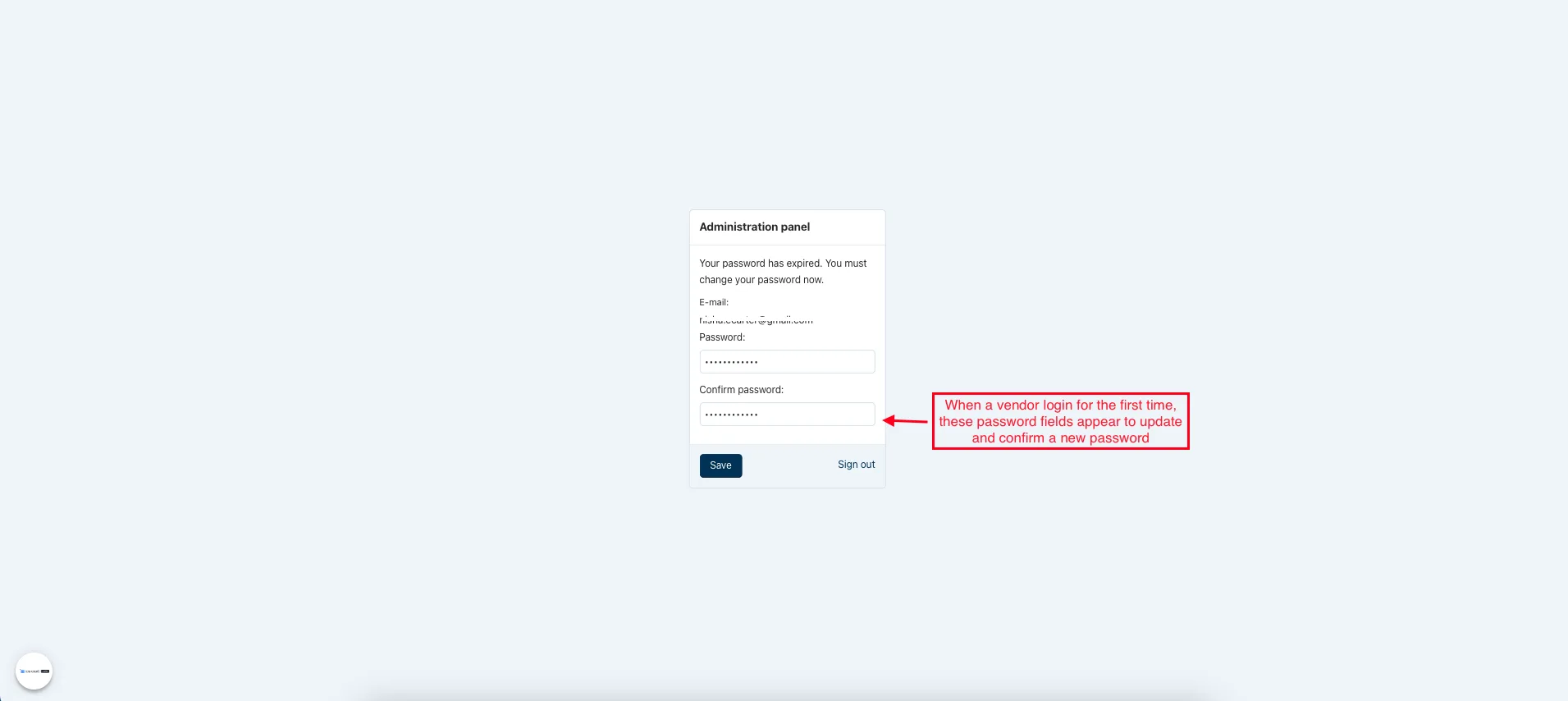
- When a vendor login for the first time, these password fields appear to update and confirm a new password.
Final Thought:
This add-on helps admins manage vendor passwords more securely by controlling password field placement and enforcing password updates on first login. It improves account safety, reduces login issues, and ensures a more secure vendor onboarding experience in the CS-Cart marketplace.
Addon-Version
Version-1.0.3
Supported Versions:
CS-Cart, CS-Cart Multivendor 4.8.x, 4.9.x,4.10x,4.11x,4.12,4.13x, 4.14x, 4.15x, 4.16x, 4.17x, 4.18x
Support:
This add-on is developed and published by Ecarter Technologies Pvt.Ltd., a CS-Cart developer. You are guaranteed a quality add-on supported by future versions. If you need help, please contact us via email at support@ecarter.co.
Frequently asked questions
Can I control where the password fields appear on the vendor registration form?
Yes. The Select Input Field option lets the admin choose after which profile field the Password and Confirm Password fields appear on the vendor registration or profile form.
Can I force vendors to change their password on first login?
Yes. When the Vendor Password Update setting is enabled, vendor admins are required to change their password the first time they log in, which improves account security.
How does the add-on prevent password entry mistakes?
During registration, vendors enter both a Password and a Confirm Password. The add-on checks that the two entries match, reducing login errors caused by mismatched passwords.
Is this compatible with my version of CS-Cart Multi-Vendor?
The add-on is built for CS-Cart vendor registration and works alongside CS-Cart's own security settings. Share your exact CS-Cart version and we will confirm compatibility.
Kajal is a Technical Content Writer at Ecarter Technologies. She writes technical documentation and in-depth guides on eCommerce platforms, mobile commerce and AI in online retail.