
Product Wise Shipping
Product Wise Shipping is an Add-on, with this add-on, it Enables flat shipping to apply a consistent rate to your products.
Product Wise Shipping is a CS-Cart add-on that lets store owners apply a flat, consistent shipping rate to their products and present shipping details in an Amazon-style layout that customers recognise. It solves the problem of unclear or inconsistent shipping costs at checkout by letting you enable flat shipping, assign a specific shipping method to flat-rate products, and show clear cost information before the customer pays. This makes shipping easier to manage for the store and more transparent for the buyer. It is aimed at CS-Cart store owners, including those running a multi-vendor marketplace, who want simpler shipping rules and a smoother checkout.

Product Wise Shipping Addon for CS-Cart allows users to enable flat shipping to apply a consistent rate to their products. Change the shipping view to look like Amazon's for a familiar experience. Select specific methods for flat shipping products, ensuring a seamless display of shipping information on the checkout page. Simplify your shipping process and enhance the customer experience.
This add-on helps simplify shipping management and improves customer satisfaction. With clear cost visibility and a smooth checkout flow, it enhances trust and makes the buying experience more convenient.
Features:
- Flat Shipping Enable: Turn on flat shipping if you want to use it.
- Shipping View Change: Make the shipping display look like Amazon’s.
- Custom Shipping Method: Pick a special shipping method for flat shipping products.
- Simplified Shipping Process: Make the shipping process easier and more efficient.
- User-Friendly Shipping Display: Enjoy a clean, easy-to-understand shipping display.
- Effortless Checkout Process: Ensure a smooth checkout experience with clear shipping info.
- Multi-vendor support: Well integrated with CS-Cart multi-vendor.
Installation
How To Install Add-on
https://store.ecarter.co/blogs/how-to-install-addon/
Configuration:
Let's Check how the addon works
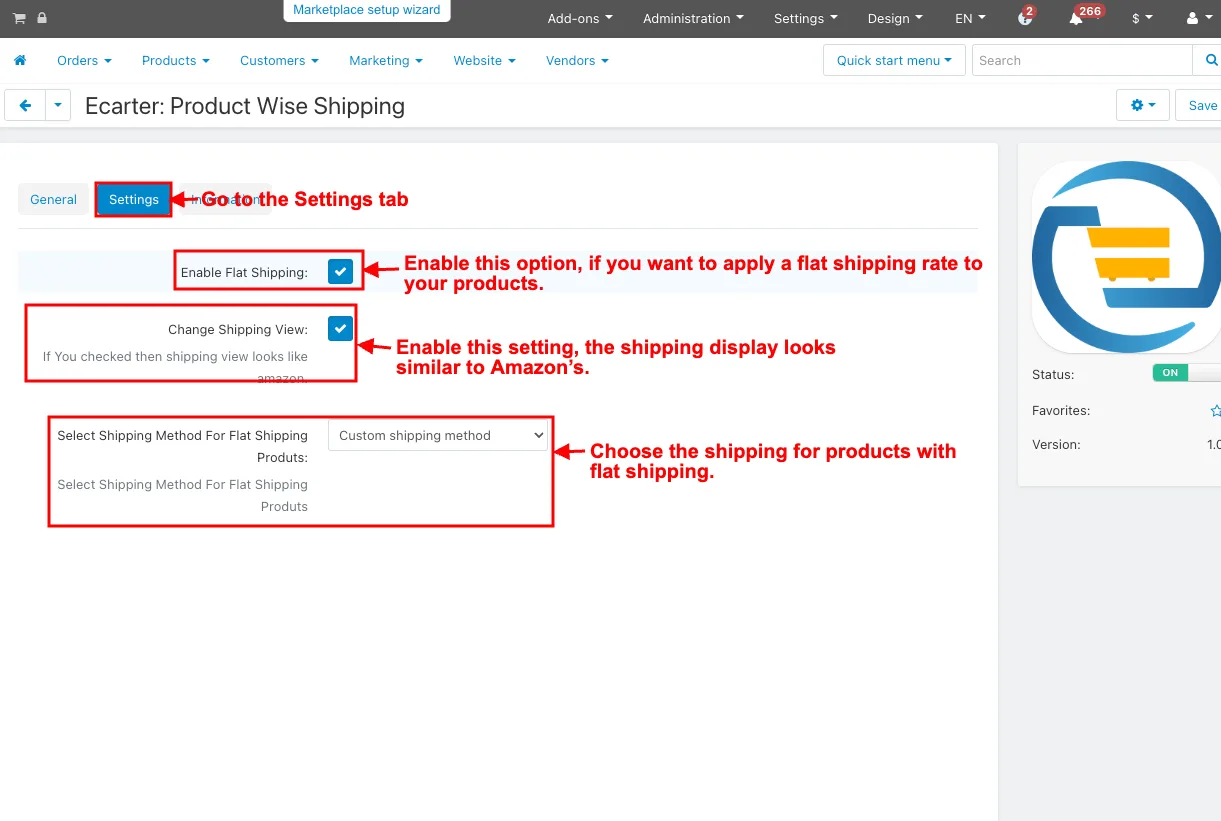
- Go to the Settings tab.
- Enable Flat Shipping: Enable this option, if you want to apply a flat shipping rate to your products.
- Change Shipping View: Enable this setting, the shipping display looks similar to Amazon’s.
- Select Shipping Method for Flat Shipping Products: Choose the shipping for products with flat shipping.
- Click on the Save button.
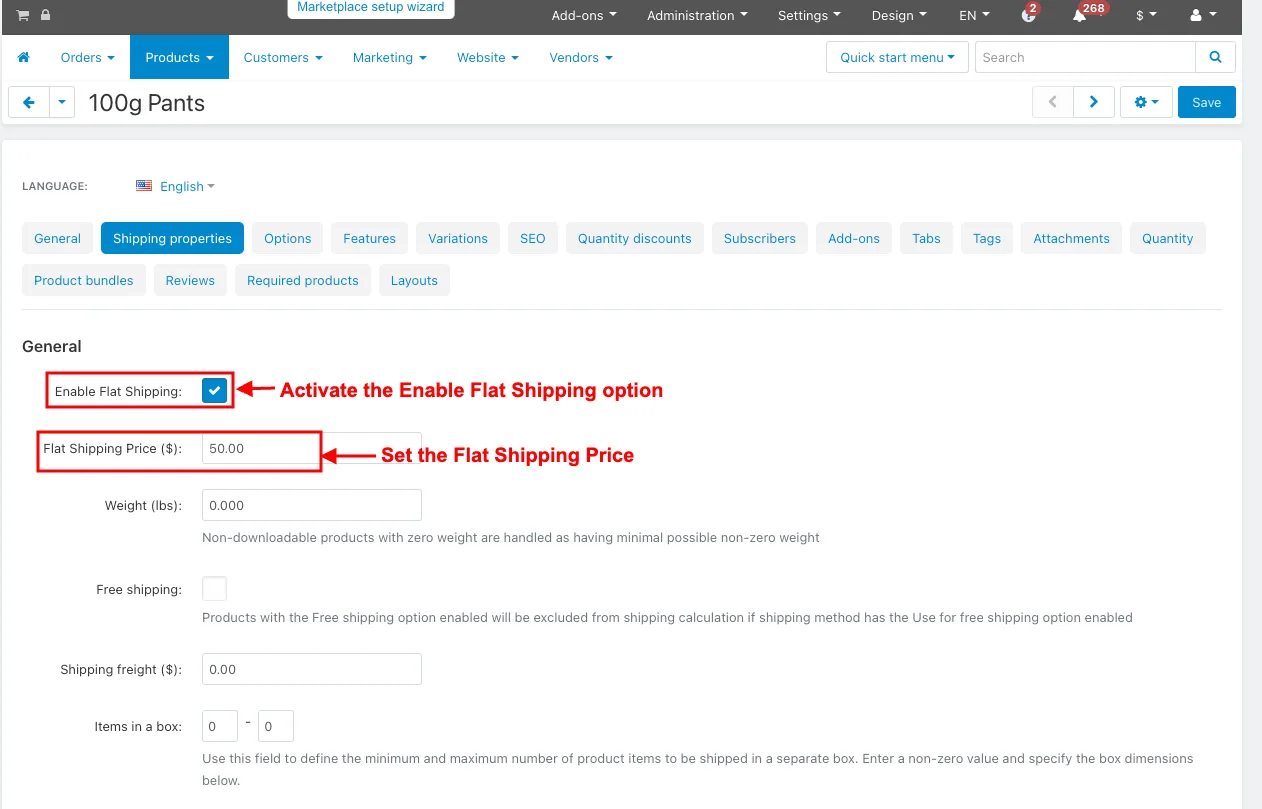
- Open the product editing page under the products page.
- Switch the Shipping Properties tab.
- Activate the Enable Flat Shipping option.
- Click on the Save button.
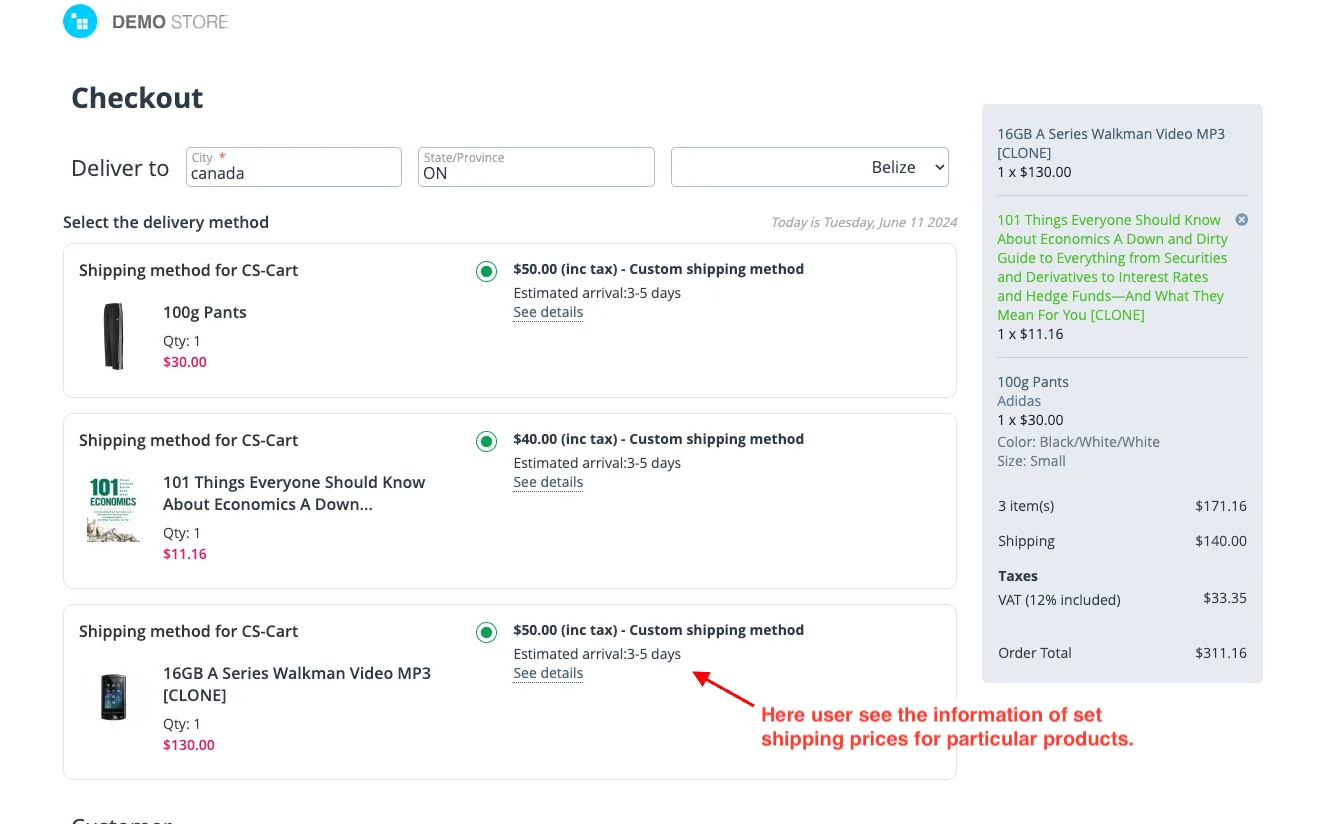
- Proceed to Checkout.
- Here users see the information of set shipping prices for particular products.
- see product has separate orders created with individual shipping costs.
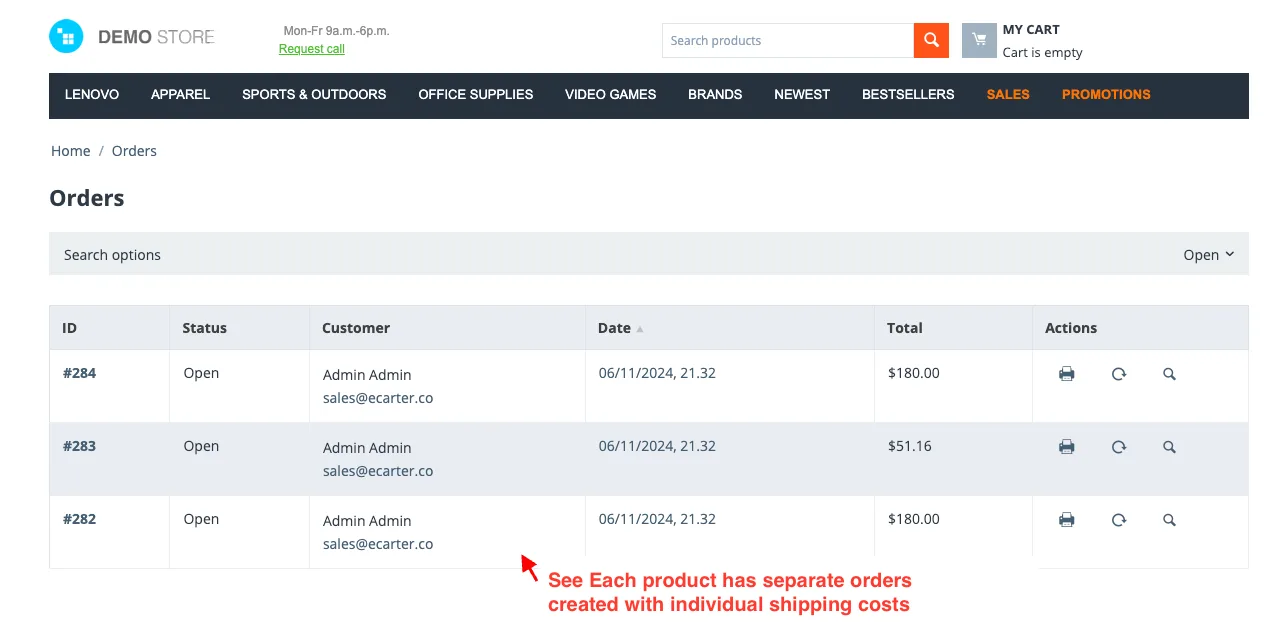
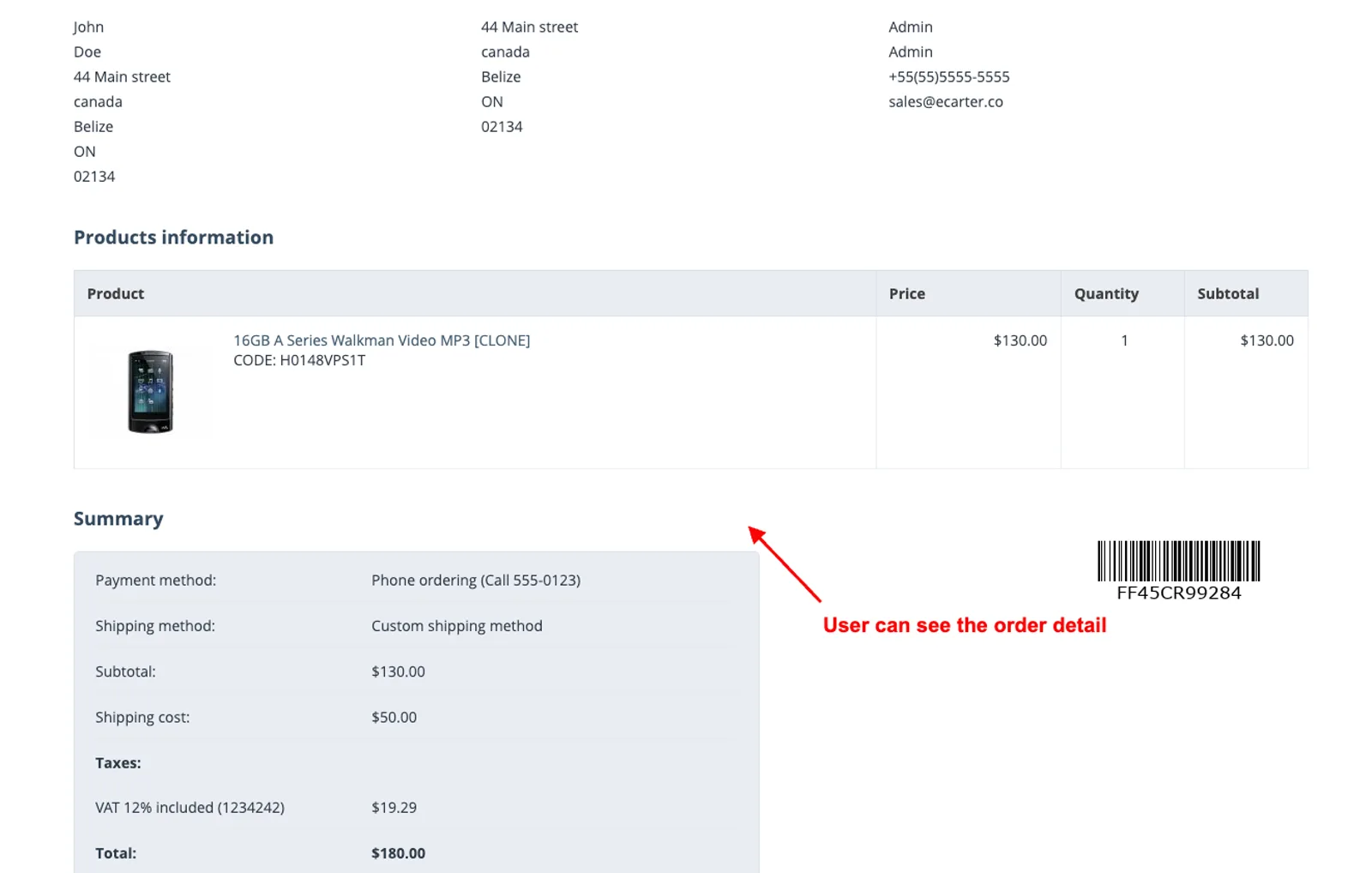
- Users see order details.
Addon-Version:
Version-1.0
Supported Versions:
CS-Cart, CS-Cart Multivendor 4.8.x, 4.9.x,4.10x,4.11x,4.12,4.13x, 4.14x, 4.15x, 4.16x, 4.17x 4.18x
Support:
This app is developed and published by Ecarter Technologies Pvt. Ltd., a CS-Cart developer. You are guaranteed quality add-ons.
Frequently asked questions
What does the Product Wise Shipping add-on do for my CS-Cart store?
It lets you enable flat shipping so a single, consistent rate applies to your products, and it changes the shipping display to an Amazon-style layout. You can also assign a specific shipping method to flat-shipping products so shipping information shows clearly on the checkout page.
Does it work with CS-Cart Multi-Vendor?
Yes. The add-on is integrated with CS-Cart Multi-Vendor, so it can be used in a multi-vendor marketplace setup as well as a standard store.
How do I enable and configure flat shipping?
After installing the add-on, go to the Settings tab and turn on the Enable Flat Shipping option to apply a flat rate to your products. From there you can also choose a custom shipping method for flat-shipping products. Full installation steps are covered in the add-on installation guide.
Which CS-Cart versions is it compatible with?
It is built for CS-Cart and works with recent versions. Share the version you are running and we will confirm compatibility before you install.
Kajal is a Technical Content Writer at Ecarter Technologies. She writes technical documentation and in-depth guides on eCommerce platforms, mobile commerce and AI in online retail.