
Product Image Restrictions
Product Image Restrictions: This addon allows the admin to restrict product images during product creation or update.
Product Image Restrictions is a CS-Cart add-on that lets store administrators control the image requirements applied when products are created or updated. From the add-on settings you can make the product image field mandatory, set minimum and maximum image width and height, cap the number of images allowed per product, and limit the maximum file size of each upload. All restrictions can be disabled at any time from the same settings, so you can enforce rules only when you need them. It is aimed at store owners and marketplace operators who want consistent, good-quality product images across their catalog and vendor listings.
This addon allows the admin control product image requirements during creation or updates. The addon provides functionality to make the image field mandatory at the time of product creation or update.
The admin can also set limits for image size, including minimum and maximum width and height. Additionally, the addon allows setting the maximum number of images that can be uploaded and the maximum file size for each image from the settings.
Features:
- Make Image Field Mandatory: Enable or disable the required image field from addon settings.
- Set Image Dimensions: Define the minimum and maximum width and height for images.
- Limit Image Uploads: Set the maximum number of images allowed for upload.
- Control Image File Size: Set the maximum file size for image uploads.
- Remove Image Restrictions: Disable all image restrictions anytime from the addon settings.
- CS-Cart Support info: The addon is well integrated with CS-Cart Multi-Vendor and can be used with its standard, Plus, and Ultimate Versions.
How to install Addon
https://store.ecarter.co/blogs/how-to-install-addon/
How Addon Works
- Access the Addon and Switch to >> Settings Tab
Addon-Settings:
- Image Required: Enable this checkbox to require an image when creating or updating a product.
- Minimum Width: Set the minimum width of the image. If set to zero, there will be no restriction on the minimum width.
- Minimum Height: Set the minimum height of the image. If set to zero, there will be no restriction on the minimum height.
- Maximum Width: Set the maximum width of the image. If set to zero, there will be no restriction on the maximum width.
- Maximum height: Set the maximum height of the image. If set to zero, there will be no restriction on the maximum height.
- Set Maximum size of the Image (in MB): Here you can set the size of the image (in MB). If set to zero, there will be no restriction on the image size.
- Set Maximum Image are Allow to upload: Set the number of images allowed for upload. If you set the value to zero, CS-Cart default value set for this.
- At the end, Click on "Save Button"
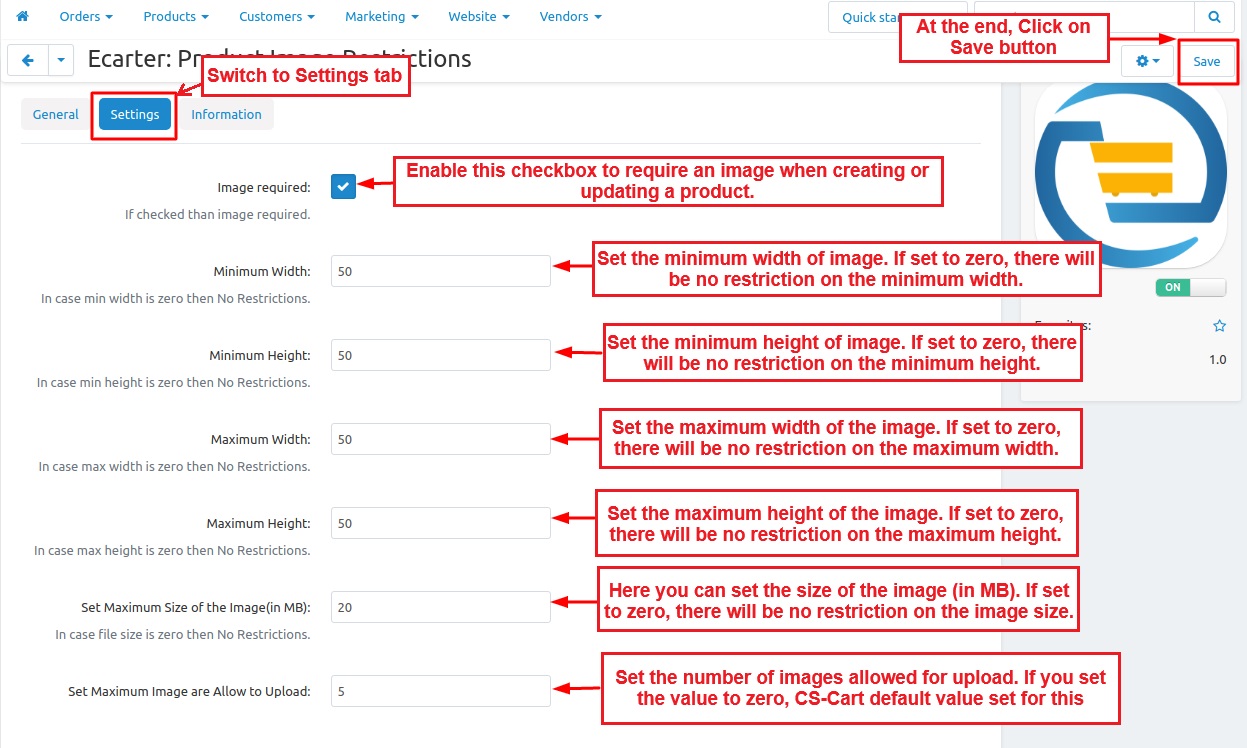
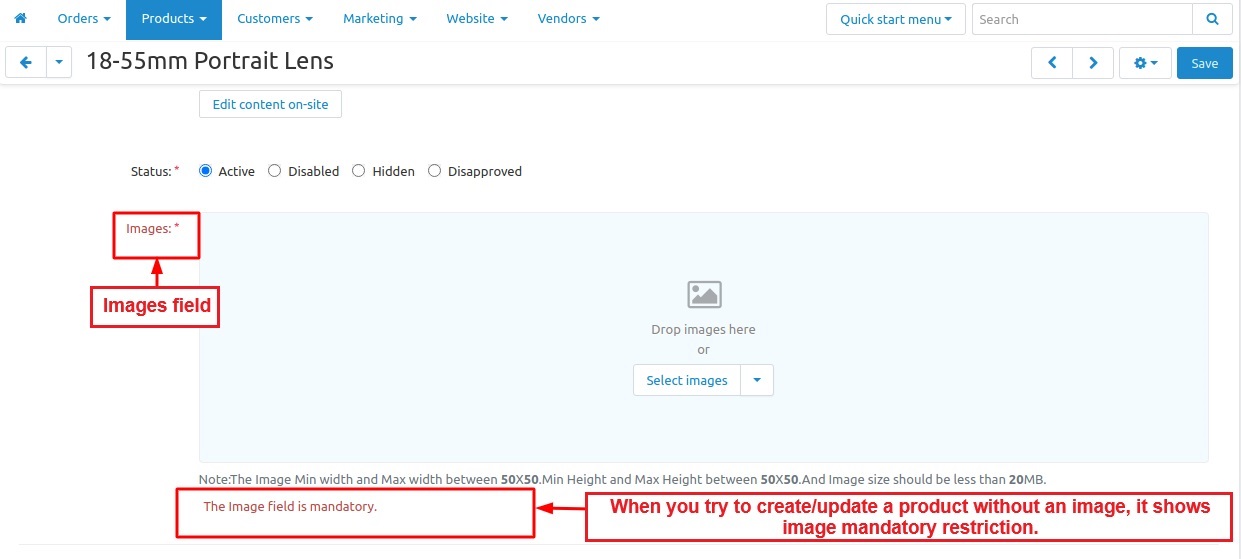
Image Field:
- The images option allows you to add different images to the field.
- When you try to create/update a product without an image, it shows image mandatory restriction.
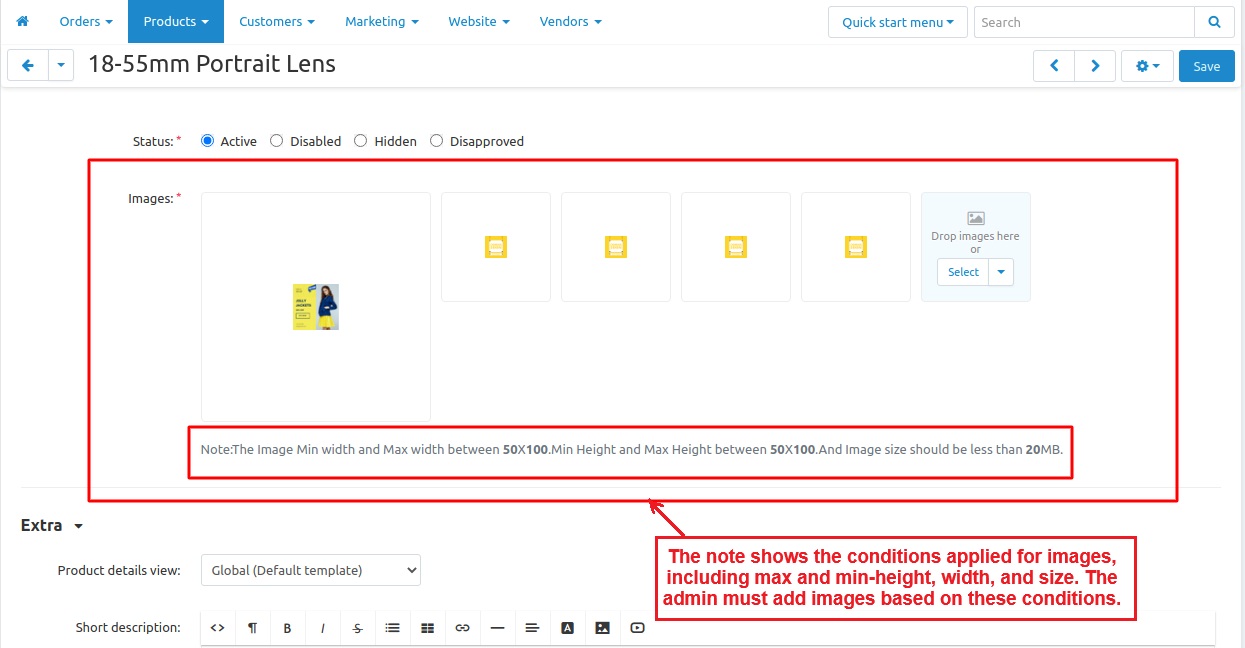
- The note explains the image requirements, including the maximum and minimum height, width, and file size. The admin must upload images that meet these conditions.
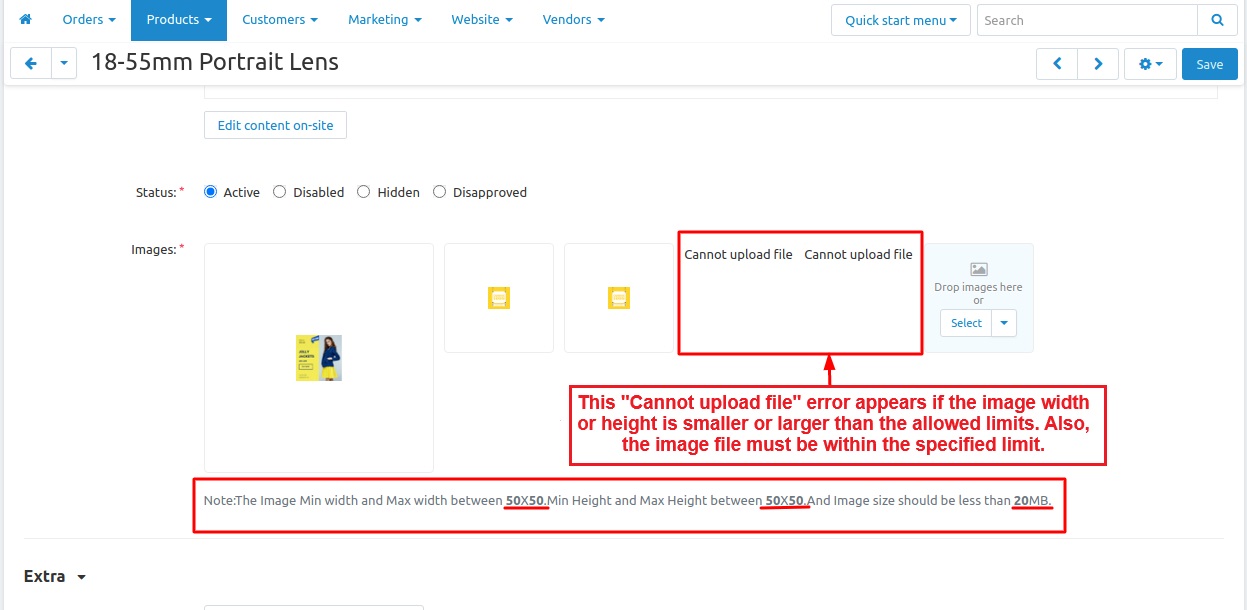
- It shows a "Cannot upload file" error if the image width or height is smaller or larger than the allowed limits. Also, the image size must be within the specified limit.
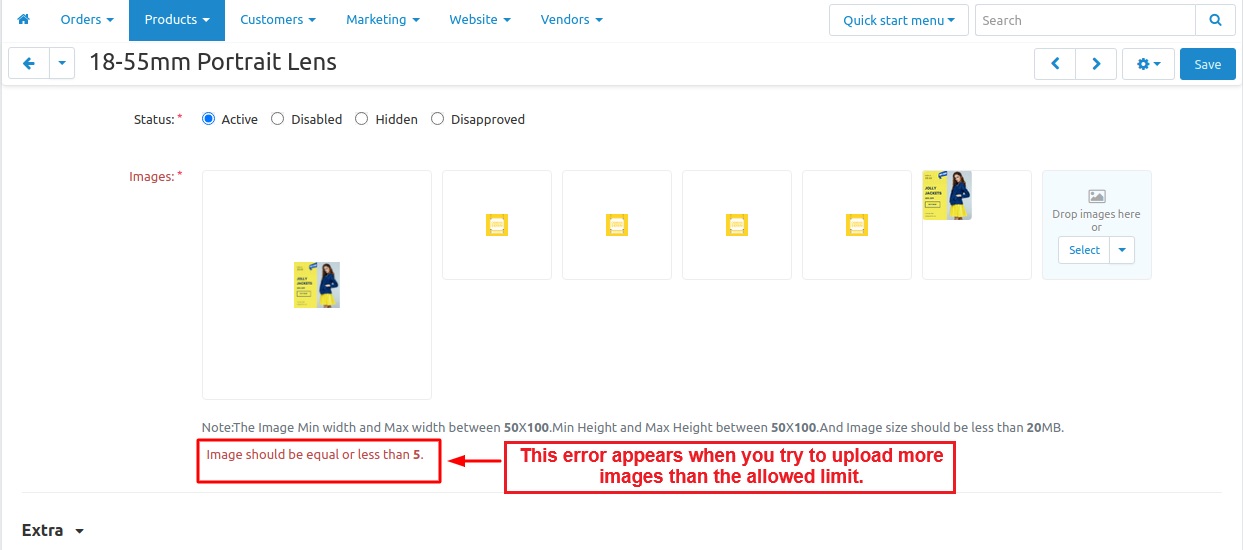
Maximum Number of Images Allowed:
- You can upload images within the allowed limit. If you try to add more than the specified limit, an error will appear.
Tutorial Link:
Addon-Version:
Version-1.0
Supported Versions:
CS-Cart, CS-Cart Multivendor 4.8.x, 4.9.x,4.10x,4.11x,4.12,4.13x, 4.14x, 4.15x, 4.16x, 4.17x, 4.18x
Support:
This add-on is developed and published by Ecarter Technologies Pvt.Ltd., a CS-Cart developer. You are guaranteed a quality add-on supported by future versions. If you need help, please contact us via email at support@ecarter.co.
Frequently asked questions
What image rules can I enforce with this add-on?
You can make the product image field mandatory, define minimum and maximum image width and height, limit the maximum number of images per product, and set the maximum file size for each image. Setting a dimension value to zero removes the restriction for that value.
Does it work with CS-Cart Multi-Vendor?
Yes. The add-on is integrated with CS-Cart Multi-Vendor and can be used with the standard, Plus, and Ultimate versions.
Can I turn the restrictions off later?
Yes. All image restrictions can be disabled at any time from the add-on settings, so you can enforce requirements only when you need them and remove them without uninstalling.
How do I install and configure it?
Installation follows the standard add-on process (see the how-to-install-addon guide), after which you open the add-on and switch to the Settings tab. There you enable the required-image checkbox and set the width, height, upload count, and file-size limits.
Nisha Gaur is a Technical Content Writer at Ecarter Technologies. She writes technical documentation, tutorials and buying guides covering CS-Cart, Magento, Shopify and eCommerce development.