
Paytm Payment Gateway
CS-Cart Paytm Payment Gateway: This addon works for payment in Cs-Cart and Paytm is verified by Visa & MasterCard Secure Code enabled gateway.
The Paytm Payment Gateway add-on integrates Paytm as a payment method at checkout in CS-Cart stores. It lets customers pay using their Paytm balance, debit or credit cards, or net banking through a gateway that supports Verified by Visa and MasterCard SecureCode. Admins set it up by entering the details provided by Paytm, and the add-on also offers a faster checkout where shoppers can securely save card, shipping, and billing information so they do not have to re-enter it on future purchases. It is intended for CS-Cart store owners in markets where Paytm is a common payment option, including those running CS-Cart Multi-Vendor.
TL;DR: CS-Cart Paytm Payment Gateway: This addon works for payment in Cs-Cart and Paytm is verified by Visa & MasterCard Secure Code enabled gateway.
This guide covers: Installation: · How to install Addon:
Paytm Payment Gateway addon for CS-Cart allows easy integration of Paytm for payments at checkout. Admin can quickly set it up on the site, and customers can pay easily. It also offers a superfast checkout where users can save card, shipping, and billing details safely. This lets them pay instantly without entering the same information every time.
Features :
- Multiple Payment options: Pay via paytm Balance, Debit/Credit cards, or Net Banking.
- Smooth Payment Process: customers can easily complete transactions.
- Automatic Currency Conversion: Converts currency based on admin settings.
- Simple Configuration: Admin just needs to enter Paytm-provided details.
- Smooth Checkout Experience: Users can easily select their preferred "Paytm Payment gateway" method at checkout.
- Cost & Risk Reduction: Minimizes operational costs and risks.
- 24/7 Support: Facilitates round-the-clock payments and customer service.
- CS-Cart Support info: The addon is well integrated with CS-Cart Multi-Vendor and can be used with its standard, Plus, and Ultimate Versions.
Installation:
How to install Addon:
https://store.ecarter.co/blogs/how-to-install-addon/
How Addon works:
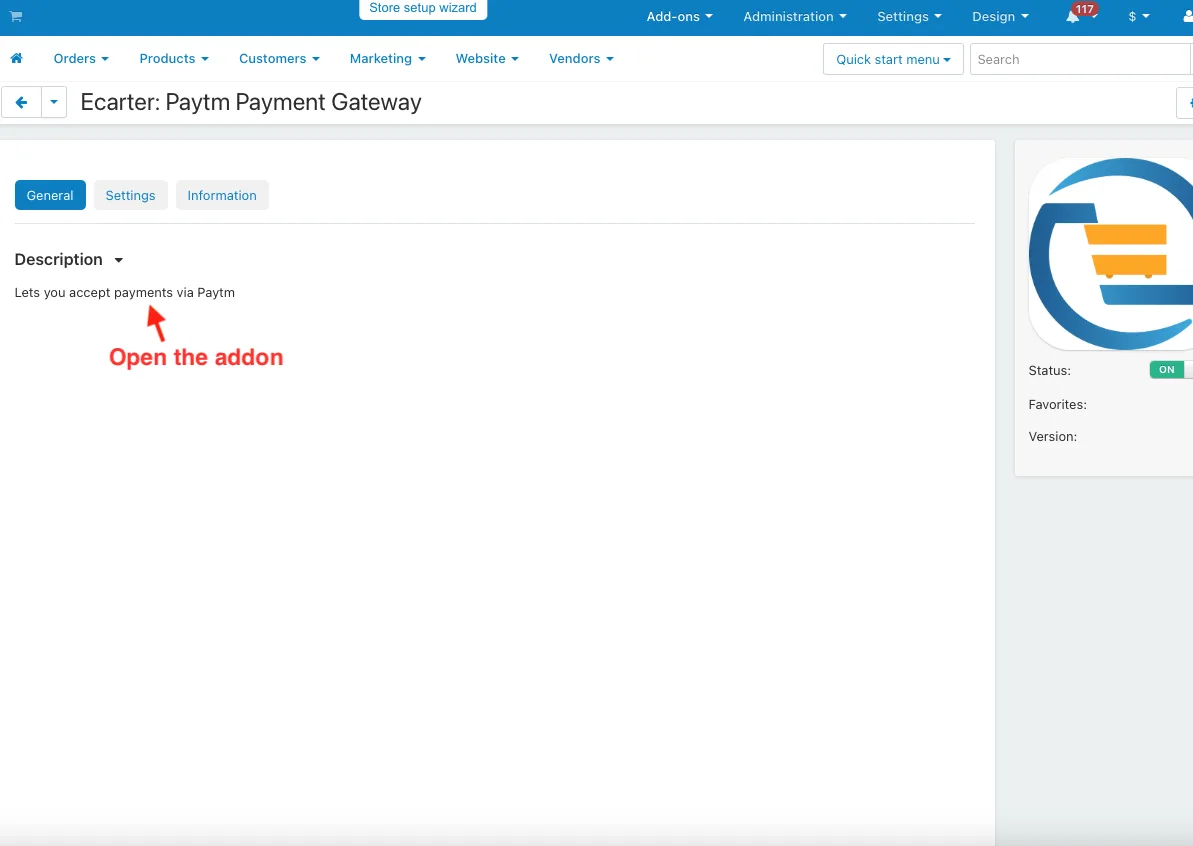
- Open the addon.
- Go to Administration >> Payment Method.
- Click on the (+) icon to add paytm payment method.

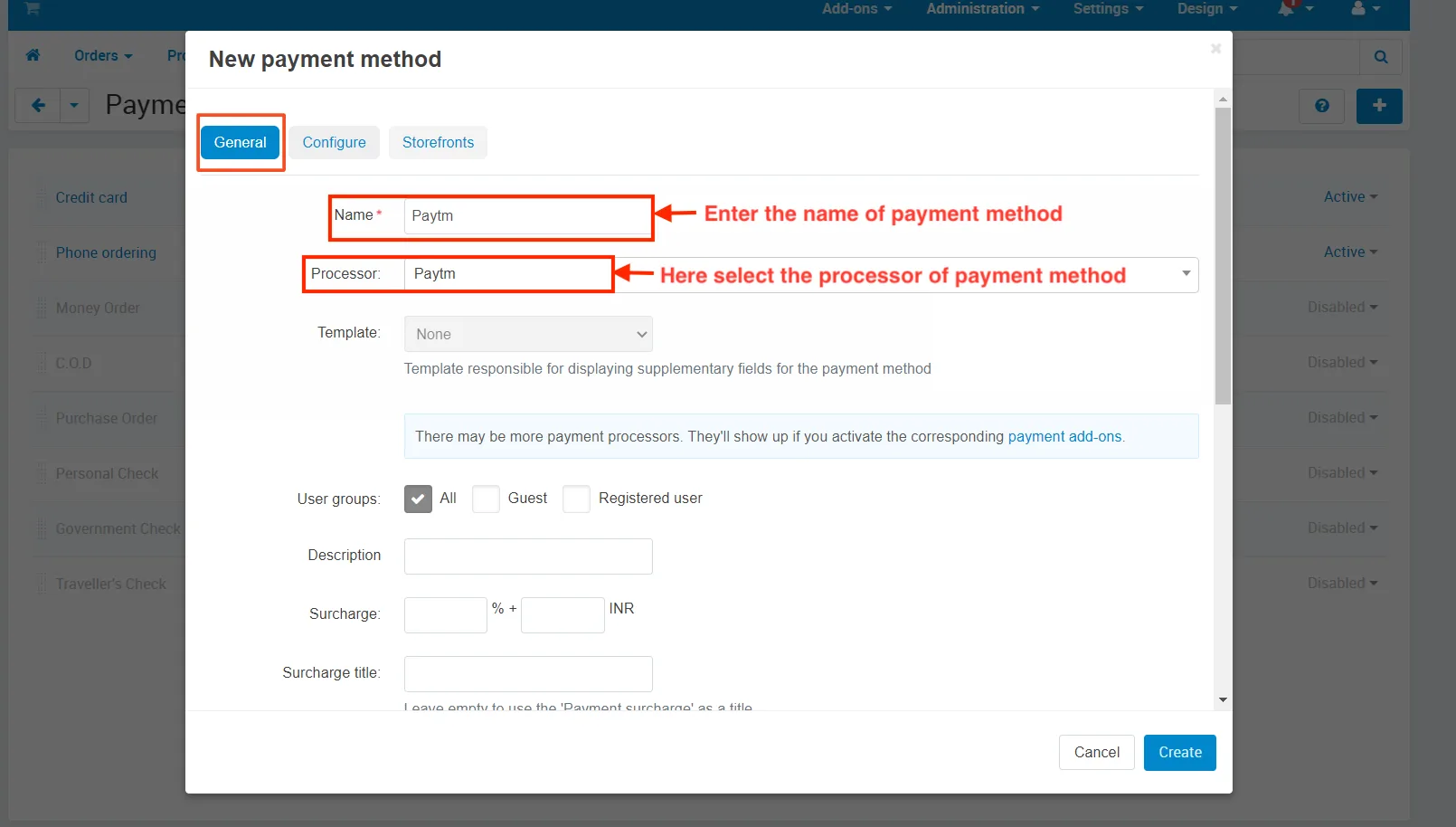
- In the General tab.
- Name: Enter the name of payment method.
- Processor: Here select the processor of payment method.
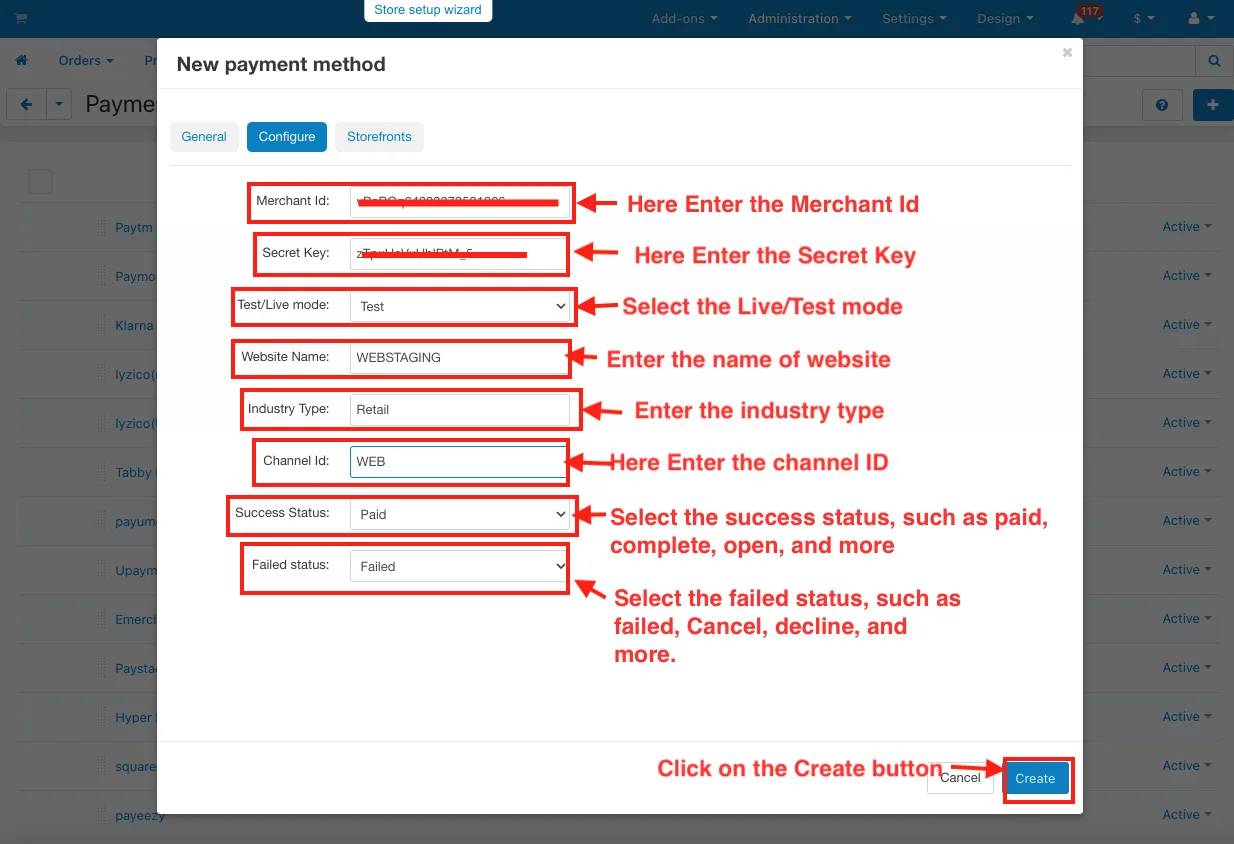
- Switch the Configure tab.
- Merchant Id: Here Enter the Merchant Id.
- Secret Key: Here Enter the Secret Key.
- Mode: Select the Live/Test mode.
- Website Name: Enter the name of website.
- Industry Type: Enter the industry type.
- Channel Id: Here Enter the channel ID.
- Success Status: Select the success status, such as paid, complete, open, and more.
- Failed status: Select the failed status, such as failed, Cancel, decline, and more.
- Click on the Create button.
- Here user chooses the Paytm payment method.
- Click on the Place order button.

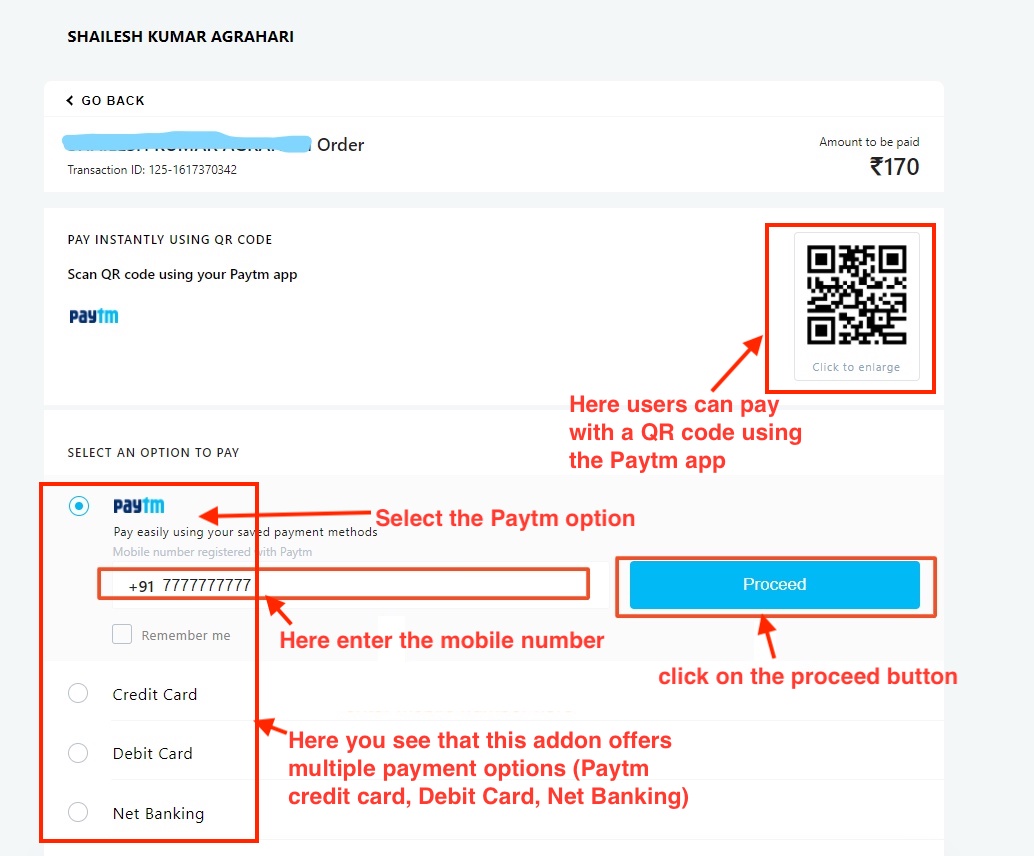
- Here users can pay with a QR code using the Paytm app.
- Here you see that this addon offers multiple payment options (Paytm credit card, Debit Card, Net Banking).
- Select the Paytm option.
- Here enter the mobile number.
- click on the proceed button.
- Here enter the OTP (one-time password).
- Click on the Verify button.

- After Verify, here see the pay with Paytm balance and pay with your saved card on your Paytm.

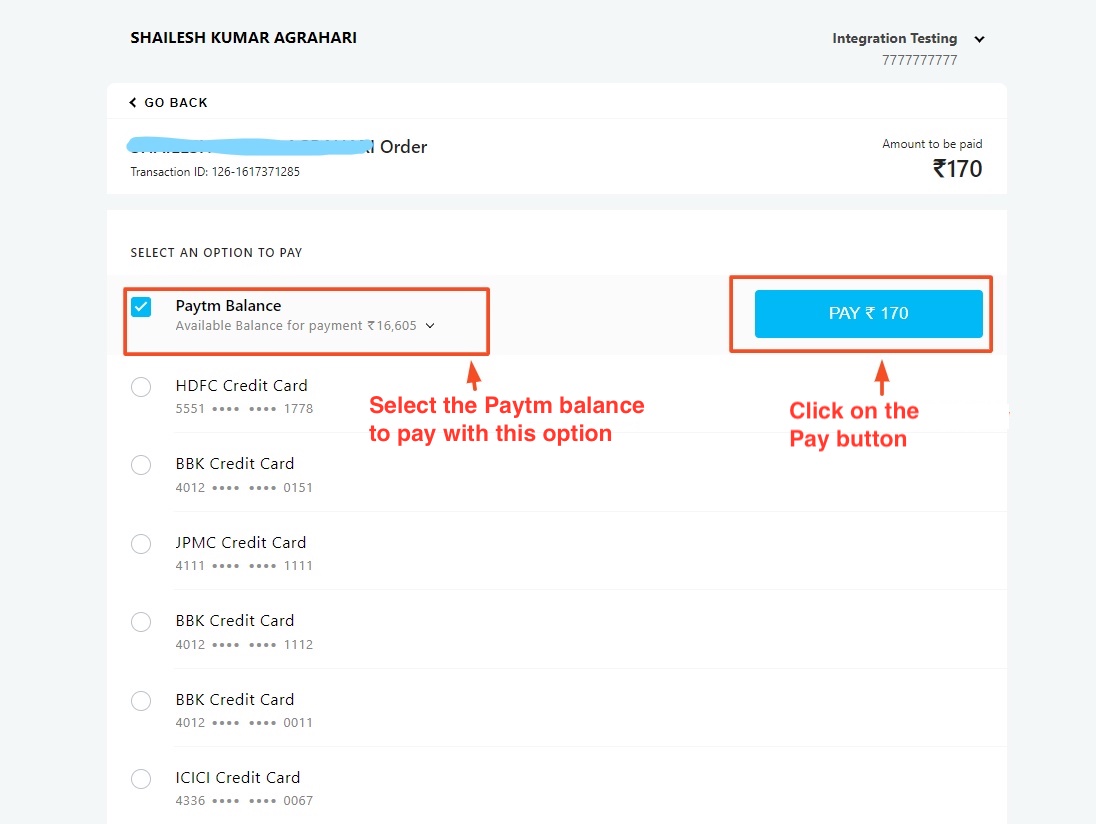
- Here you see pay with Paytm balance.
- Select the Paytm balance to pay with this option.
- Click on the Pay button.
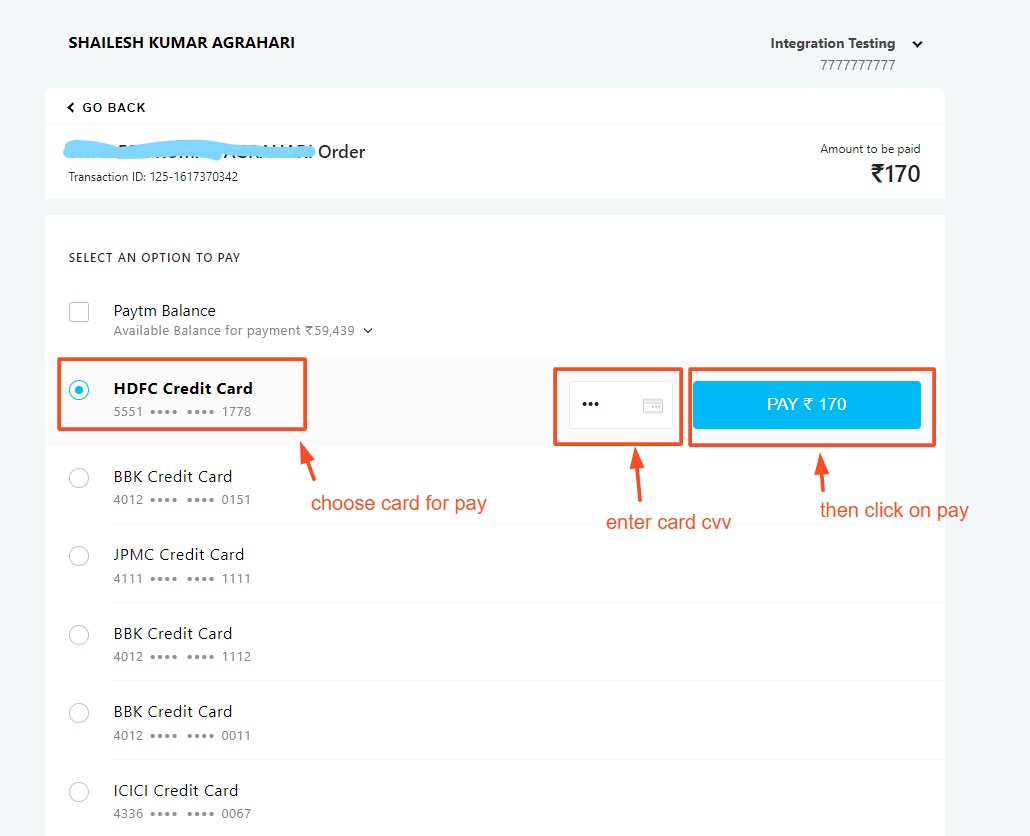
- Now pay with save cards.
- Select any card.
- Here enter the cvv.
- Click on the Pay button.
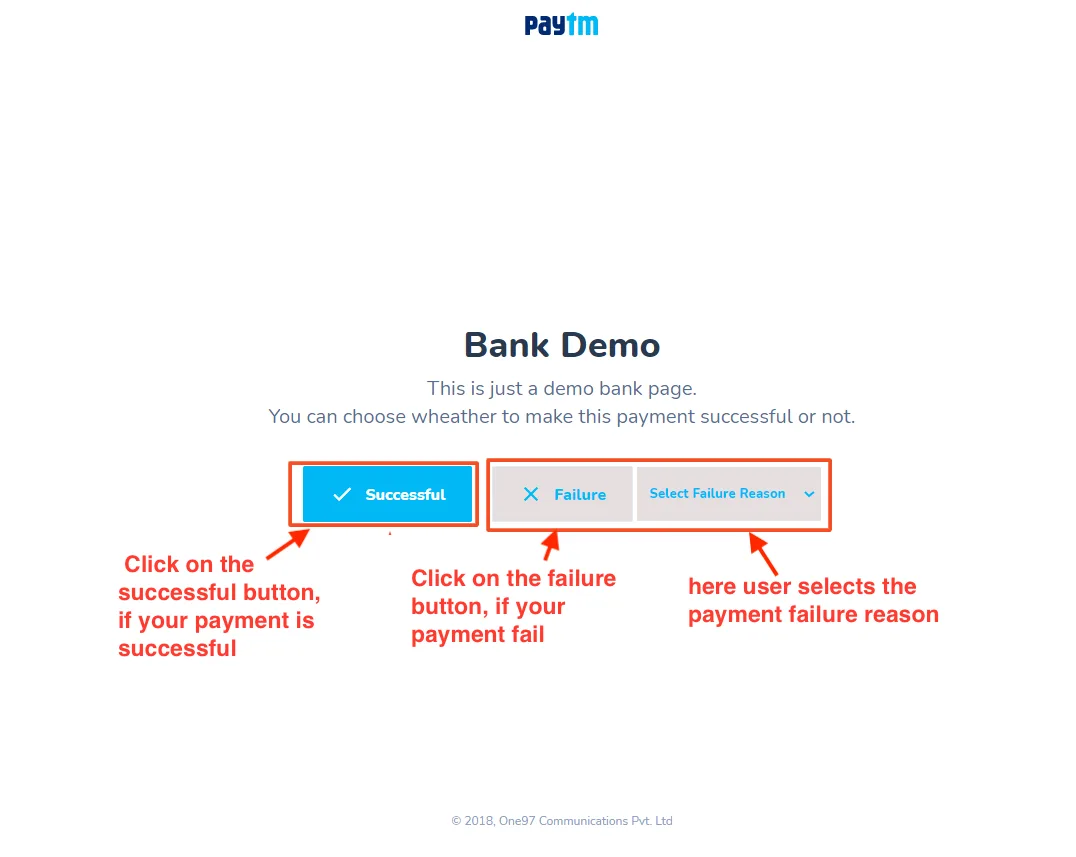
- Successful: Click on the successful button, if your payment is successful.
- Failure: Click on the failure button, if your payment fails.
- Select failure reason: here user selects the payment failure reason.
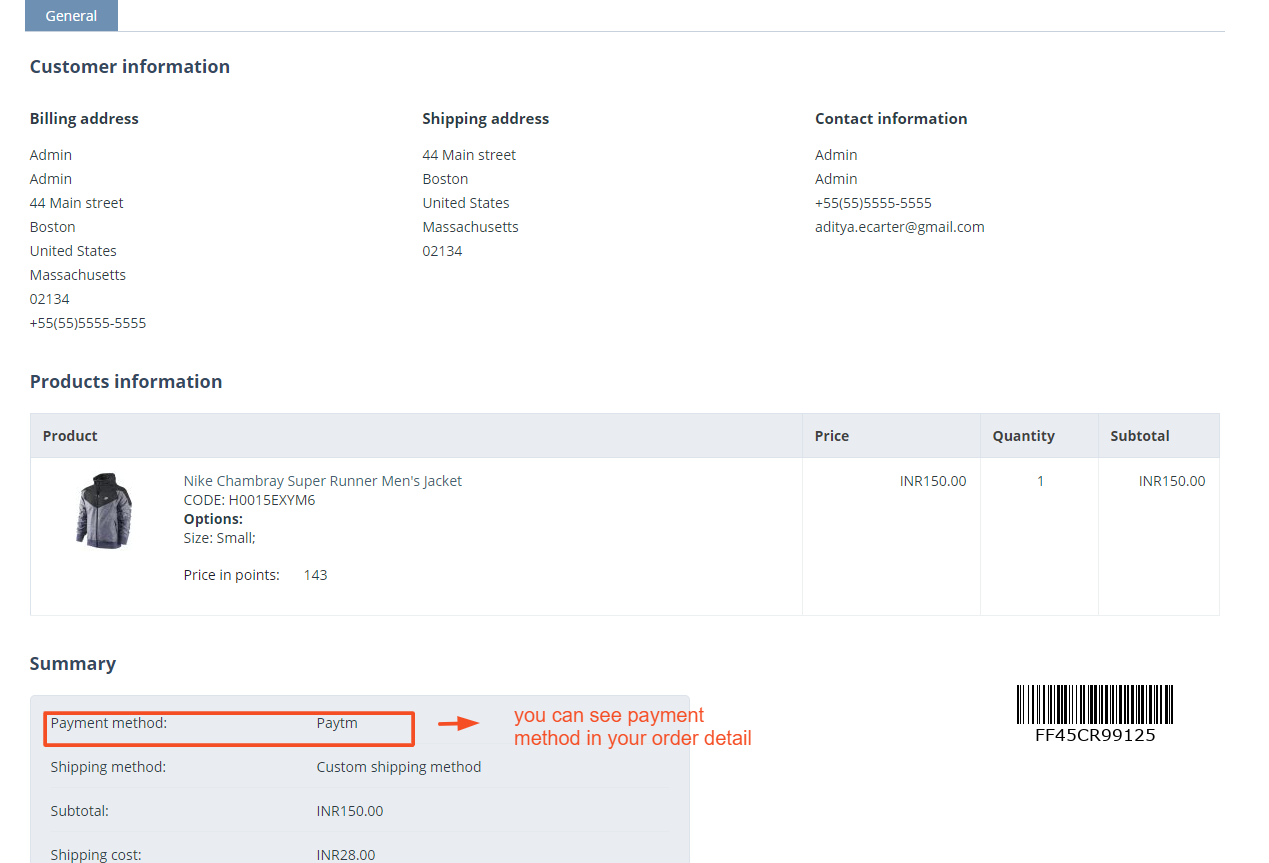
- you can see the payment method in your order detail.
Tutorial Video:
Addon-Version:
Version-1.0
Supported Versions:
CS-Cart, CS-Cart Multivendor 4.8.x, 4.9.x,4.10x,4.11x,4.12,4.13x, 4.14x, 4.15x, 4.16x, 4.17x, 4.18x
Support:
This add-on is developed and published by Ecarter Technologies Pvt.Ltd., a CS-Cart developer. You are guaranteed a quality add-on supported by future versions. If you need help, please contact us via email at support@ecarter.co
Frequently asked questions
Which payment methods does the Paytm Payment Gateway add-on support?
Customers can pay using their Paytm balance, debit or credit cards, or net banking. The gateway is enabled for Verified by Visa and MasterCard SecureCode.
Is the add-on compatible with CS-Cart Multi-Vendor?
Yes. It is integrated with CS-Cart Multi-Vendor and works with the Standard, Plus, and Ultimate versions.
How is the add-on configured?
The admin installs the add-on and enters the details provided by Paytm to connect the gateway. Once configured, customers can select Paytm as their payment method at checkout.
Does it support currency conversion?
Yes. The add-on can automatically convert currency based on the settings the admin defines. It also provides round-the-clock support for payments and customer service.
Kajal is a Technical Content Writer at Ecarter Technologies. She writes technical documentation and in-depth guides on eCommerce platforms, mobile commerce and AI in online retail.