
Message Center With Attachment
CS-Cart Message Center With Attachment: This addon allows customer, admin, and vendors to include any attachment like any image or any document in the message.
Message Center With Attachment is a CS-Cart Multi-Vendor add-on that lets customers, admins, and vendors attach files to their messages in the Message Center. It adds file attachment support for images and documents (such as PDF and JPG) so users can share order details, receipts, or reference files directly inside a conversation instead of describing them in text. Attached files are stored and can be downloaded at any time, and an order-level communication tab keeps past messages between the customer, vendor, and admin in one place. It is intended for CS-Cart Multi-Vendor stores that want clearer, file-based communication around orders, and it requires the CS-Cart Message Center add-on.
The addon provides functionality to share attachment files in the message center. Customers, admins, and vendors attach images or documents to messages, making communication easier. This helps them share important details quickly. Customers and vendors can discuss orders, share files, and stay updated. Admins also track messages easily.
The Addon is dependent on CS-Cart Message Center Addon.
Features:
- File Attachment Support: Users can attach image and document files (PDF, JPG) to messages for better communication.
- Message Center for Admin and Vendor: Both admin and vendors have a dedicated Message Center to track and reply to conversations.
- Order Communication tab: In order details, this shows past messages between the customer, vendor, and admin and allows further communication.
- Downloadable Attachments: Attached files are stored and can be downloaded anytime.
- CS-Cart Support info: The addon is well integrated with CS-Cart Multi-Vendor and can be used with its standard, Plus, and Ultimate Versions.
How to install Addon
https://store.ecarter.co/blogs/how-to-install-addon/
How addon works
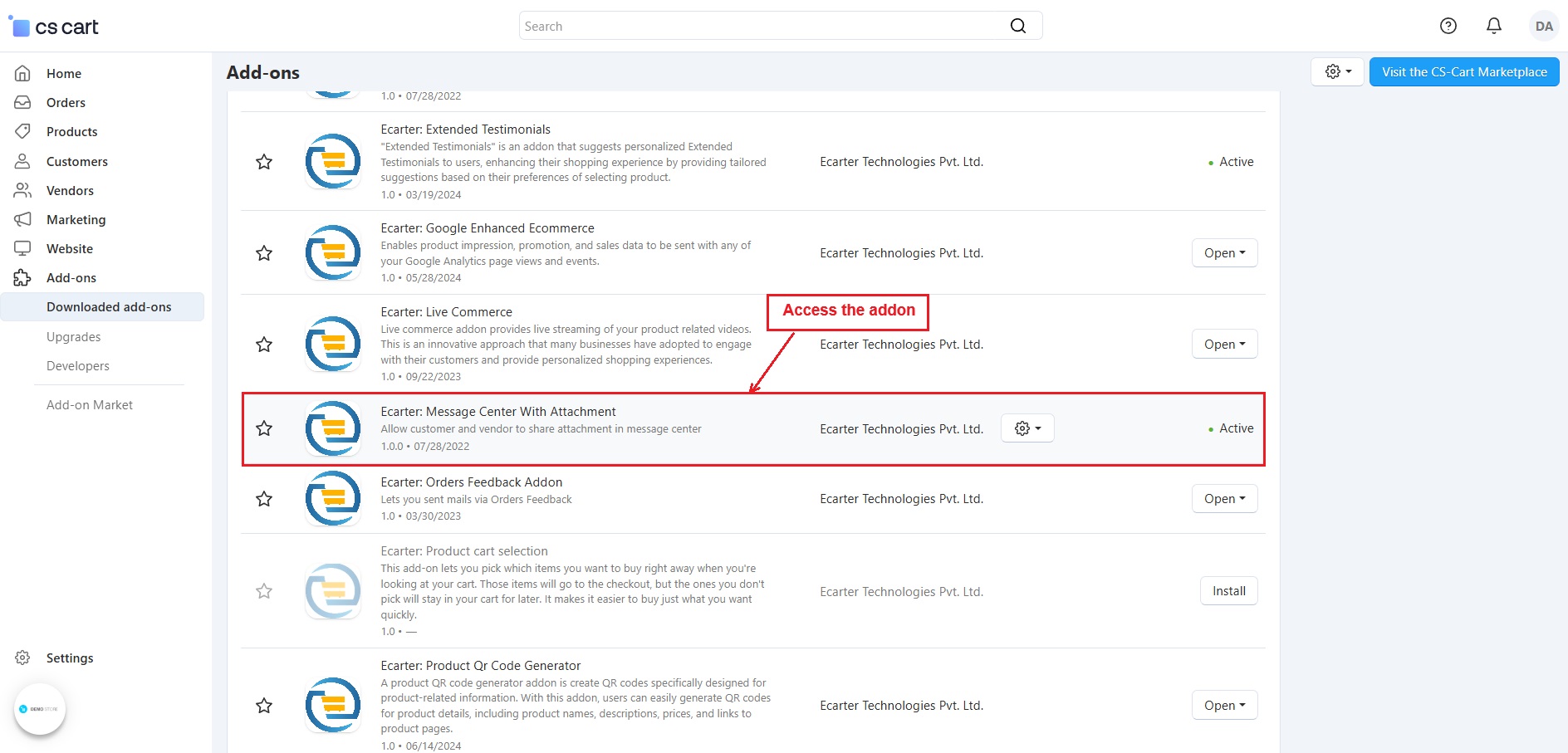
- Access the >> Addon
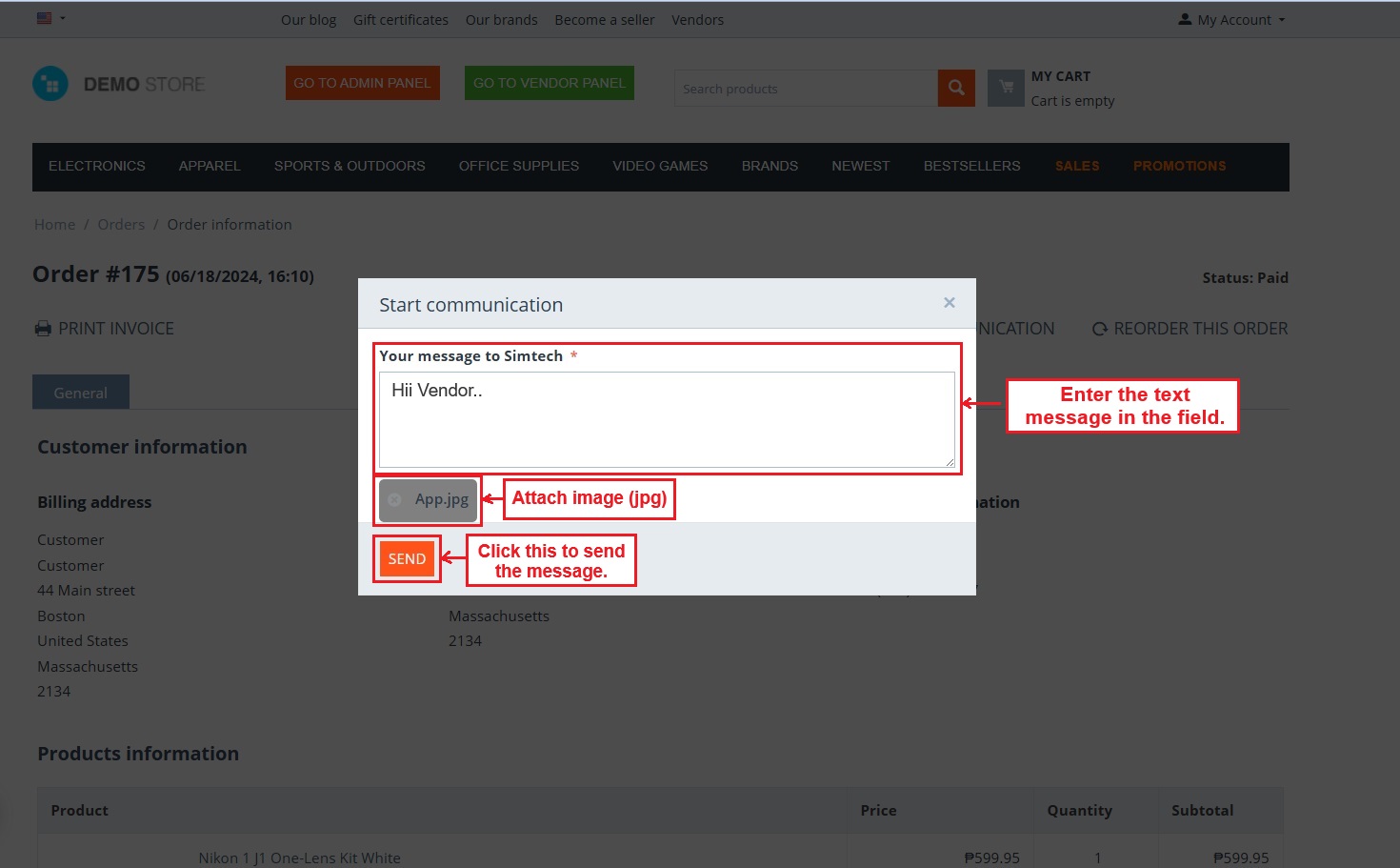
- Once an order is placed, the order details page shows a "Start Communication" tab. Click on this.

- A pop-up appears, allowing users to enter a text message, attach a file (PDF or JPG), and click the send button.
- Attached a pdf file.
- Then, click on >> Send button.

- Attached an image file in the message.
- The notification appears after a message is successfully transferred.
- Now, in the communication tab, the customer can view messages, attached files, and send more messages and attach files.

- This page shows the previous messages and the newly entered message with the attached image file.

- Order communication tab with complete conversations among Customer, Vendor, and Admin.

Message Center With Attachment in Admin Panel
- Go to >> Customers
- Click on >> Message Center
- In the Message Center page, click the latest thread ID to view messages.

Thread to attach a file in the message:

- These chats show communication among the customer, Admin, and Vendor in the Admin Panel.

Message Center With Attachment in Vendor Panel
- In the vendor panel, go to >> Message center.
- Click on >> Vendor Communication
- Now you see a list of created threads. Click the latest one to view and reply to messages.

Thread to attach a file in the message:

- The vendor enters text in the field and uses the attachment button to add a file.

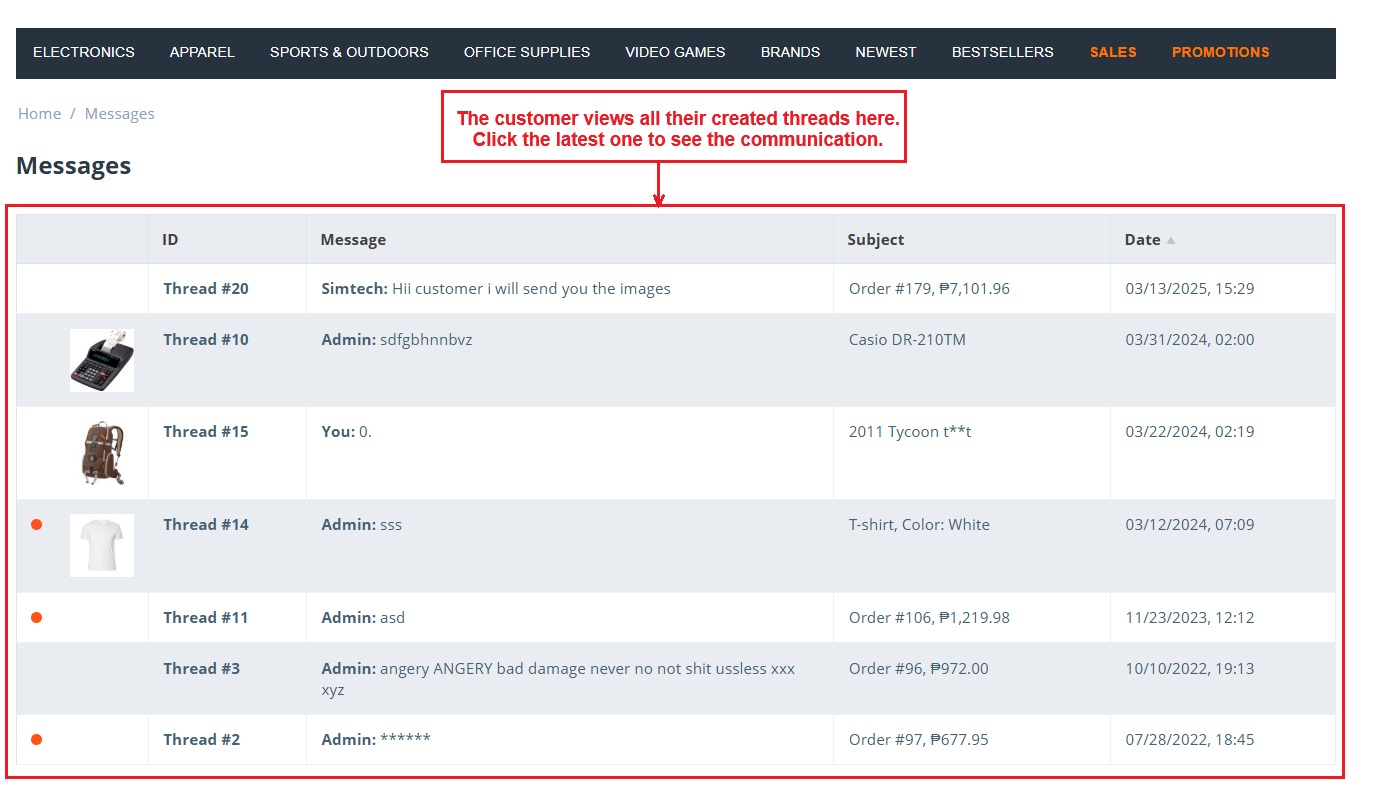
Messages in My Account:

- The customer views all their created threads here. Click the latest one to see the communication.
Addon-Version:
Version-1.0
Supported Versions:
CS-Cart, CS-Cart Multivendor 4.8.x, 4.9.x,4.10x,4.11x,4.12,4.13x, 4.14x, 4.15x, 4.16x, 4.17x, 4.18x
Support:
This add-on is developed and published by Ecarter Technologies Pvt.Ltd., a CS-Cart developer. You are guaranteed a quality add-on supported by future versions.
If you need help, please contact us via email at support@ecarter.co.
Frequently asked questions
What file types can be attached to messages?
Users can attach image and document files, such as PDF and JPG, to their messages. The attached files are stored and can be downloaded at any time.
Is this add-on compatible with CS-Cart Multi-Vendor and which editions?
Yes. It is integrated with CS-Cart Multi-Vendor and can be used with the Standard, Plus, and Ultimate versions.
Does it require any other add-on to work?
Yes. It depends on the CS-Cart Message Center add-on, which must be installed for the attachment functionality to work.
How does the file attachment work on an order?
Once an order is placed, the order details page shows a communication tab ("Start Communication"). Clicking it opens a pop-up where you can enter a text message, attach a PDF or JPG file, and send it to the customer, vendor, or admin.
Nisha Gaur is a Technical Content Writer at Ecarter Technologies. She writes technical documentation, tutorials and buying guides covering CS-Cart, Magento, Shopify and eCommerce development.